Down Payment Calculator - Calculate Down Payment & EMI
This guide explains what a down payment is and how a down payment calculator can help you plan large purchases funded by loans. You will learn what a down payment represents in a loan transaction, how online calculators simplify planning by translating purchase price and financing choices into an upfront cash requirement, and why using a calculator before you commit to a loan improves budgeting and comparison of offers. Whether you are buying a home, a vehicle, or financing an expensive appliance, understanding the down payment and its effect on monthly repayments and total borrowing costs matters. This page focuses on practical guidance: what the calculator does, how it supports decision-making, common outcomes you should pay attention to, and the typical benefits of running scenarios before you sign a loan agreement. The aim is to equip you with the knowledge to use an online down payment tool effectively so you can set realistic budgets, compare lender offers, and avoid surprises in loan processing and monthly obligations.
What Is Down Payment?
A down payment is the portion of the purchase price that a buyer pays upfront at the time of purchase, with the remaining balance typically financed through a loan. It represents the buyer’s initial equity in the asset and reduces the amount that needs to be borrowed from a lender.
In practical terms, a larger down payment lowers the borrowed amount and can influence the borrower’s relationship with the lender, potentially affecting loan approval, required documentation, or the structure of the loan offer. Understanding the role of the down payment helps you make an informed decision about how much cash you should allocate when planning a financed purchase.
What Is Down Payment Calculator?
A down payment calculator is an online tool that helps you estimate the upfront cash needed for a purchase that will be partly financed by a loan. By entering the purchase price and useful optional inputs related to the loan, the calculator provides an immediate figure for the down payment and shows how that choice affects the financed amount.
These calculators are designed to be quick and user-friendly so you can test different scenarios, such as varying the down payment amount or considering additional upfront fees, to see how each option changes the finance requirement. They are useful for early-stage budgeting and for comparing multiple offers from lenders without manual calculations.
Down Payment Calculator Formula
Most calculators use the purchase price and the down payment percentage or amount to determine the upfront payment and the residual amount to be financed. Some tools also let you factor in one-time charges related to loan processing or dealer fees so you see a fuller picture of initial cash outflow.
The purpose of exposing the underlying computation in a calculator is to help you understand the relationship between the inputs and the resulting financed amount. When using any tool, check whether it allows different input types (absolute amount versus percentage) and whether it shows both the upfront payment and the loan principal so you can compare scenarios easily.
Down Payment Calculation Example
A realistic example in a calculator walks you through entering the asset price and selecting a preferred down payment amount or percentage. The tool then displays the expected upfront cash requirement and the remaining balance that would need to be financed, often in an easy-to-read summary.
Going through an example helps highlight how increasing the down payment reduces the financed amount and can change monthly obligations once a loan is taken. It also demonstrates how additional upfront charges included in many transactions can increase the total initial cash outlay beyond the nominal down payment figure.
How To Use ClearTax Down Payment Calculator?
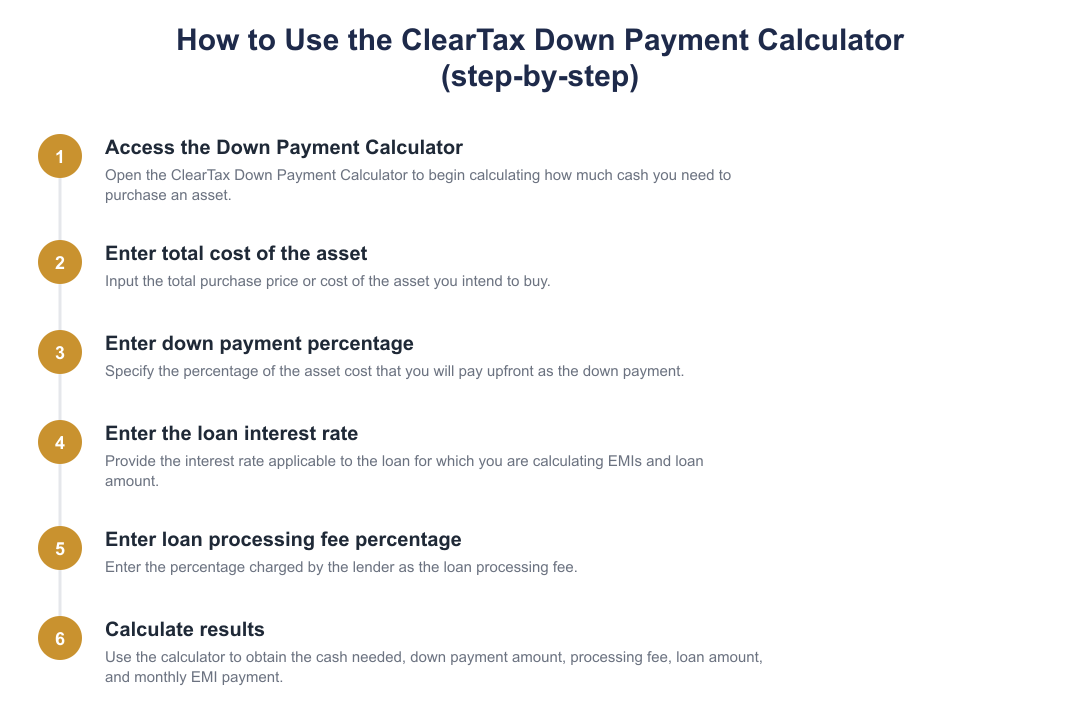
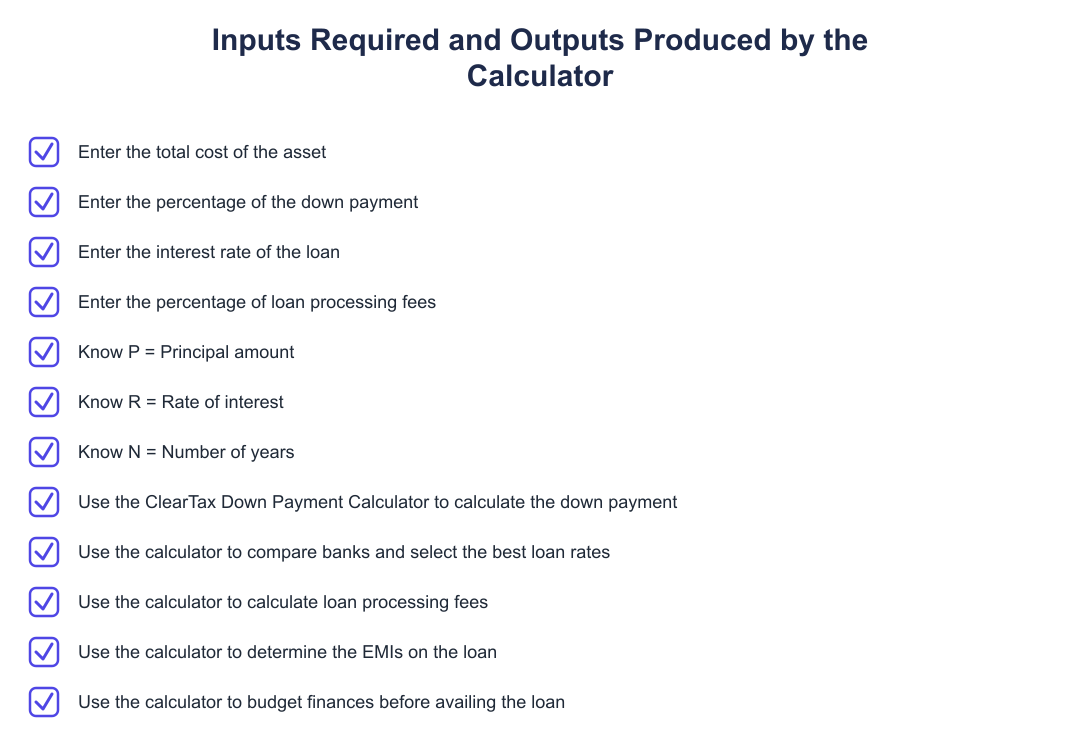
When using an online down payment calculator, begin by entering the purchase price of the asset and then specify the down payment either as a percentage or a fixed amount, depending on the inputs the tool accepts. If the tool offers fields for additional upfront fees or loan-related charges, include those to get a complete picture of the initial cash requirement.
After inputting these values, review the output that shows the upfront payment and the amount remaining to be financed. Use the ability to tweak inputs to compare scenarios, this helps you decide whether to conserve cash or reduce future monthly obligations by increasing the initial payment.
Benefits Of Down Payment Calculator
A down payment calculator speeds up planning by delivering immediate estimates for upfront cash needs and financed amounts, enabling better short-term budgeting. This is helpful for deciding whether you can afford the initial payment and for preparing funds in advance.
It also supports comparison shopping, by running multiple scenarios you can see how different down payments change what you must borrow and how offers from different lenders may stack up. Finally, using a calculator reduces manual arithmetic errors and gives clearer visibility into how optional fees and different payment choices affect your overall financing plan.
Frequently Asked Questions
Common questions around down payments include how the upfront amount affects monthly payments, whether one should pay more upfront or conserve cash, and what fees are commonly included in initial outlays. A calculator can answer these in an indicative way, but it does not replace lender-specific quotes that reflect eligibility and formal terms.
If you need precise loan schedules or legally binding figures, obtain official quotes from lenders and review the loan agreement carefully. The calculator is best used for planning and comparison before you approach lenders or commit to an offer.
Using a down payment calculator is a practical step in financing large purchases. It provides clarity on initial cash needs, helps compare scenarios, and supports informed budgeting. Always follow up calculator results with lender quotes and read loan terms carefully before committing.
Frequently asked questions
What is a down payment and why do I need to pay it?
A down payment is an upfront portion of the total purchase price you pay in cash before taking a loan. It reduces the principal loan amount (for example, a 20% down payment on a ₹50 lakh property means paying ₹10 lakh and borrowing ₹40 lakh), which lowers your interest burden and monthly EMIs and can improve loan approval chances. Lenders often require a minimum down payment percentage depending on the asset type and their policies, and a larger down payment may reduce processing fees or interest rates in some cases. However, putting more cash down reduces your liquid savings, so balance affordability with liquidity needs.
How do I calculate the down payment for an asset?
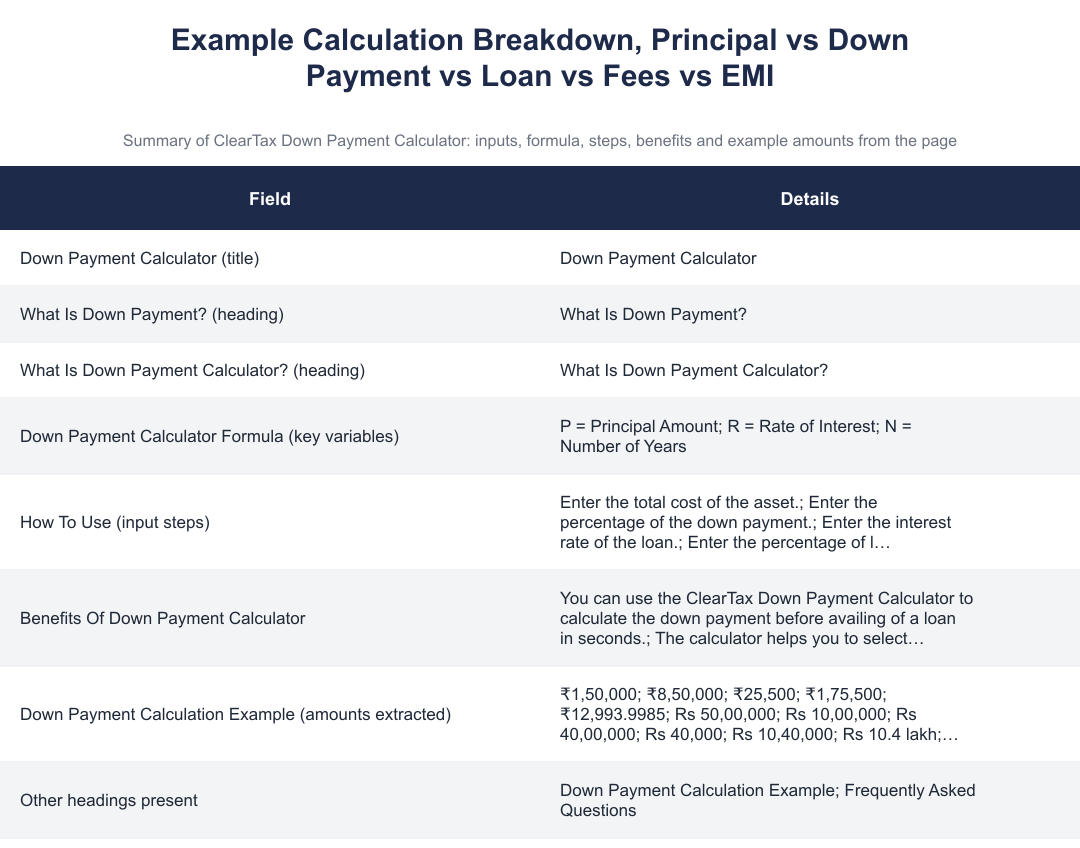
You calculate the down payment by multiplying the total cost of the asset by the down payment percentage (Down payment = Total cost × Down payment %). For example, if the asset costs ₹50,00,000 and the down payment is 20%, the down payment is ₹50,00,000 × 20% = ₹10,00,000, and the loan required becomes ₹40,00,000. After this you should also factor in loan processing fees (usually expressed as a percentage of the loan) and any taxes or registration charges to know the total cash required upfront. Use an online down payment calculator to get these values instantly and avoid manual errors.
What formula does the ClearTax Down Payment Calculator use for EMI?
The ClearTax Down Payment Calculator uses the standard EMI formula: EMI = [P × r × (1+r)^N] / [(1+r)^N − 1], where P is the principal (loan amount), r is the monthly interest rate (annual rate/12), and N is the total number of monthly instalments. For example, with a loan principal of ₹40,00,000 at 7.2% annual interest (r = 0.06% monthly) over 20 years (N = 240), you plug these values into the formula to compute the monthly EMI. The calculator automates this computation and returns the monthly EMI along with total interest payable so you can compare repayment scenarios quickly. Remember to convert the annual rate to a monthly decimal before using the formula (annual rate/12/100).
How much total cash do I need upfront to buy an asset when taking a loan?
Total upfront cash equals the down payment plus any loan processing fee (and other charges like registration or taxes if applicable). Concretely, Total cash = (Asset cost × Down payment %) + (Loan amount × Processing fee %). For example, on a ₹50,00,000 asset with 20% down (₹10,00,000) and a 1% processing fee on the ₹40,00,000 loan, upfront cash = ₹10,00,000 + ₹40,000 = ₹10,40,000, excluding any registration or stamp duties. Use the ClearTax Down Payment Calculator to include these values automatically so you know the exact cash required before applying for a loan.
How do I use the ClearTax Down Payment Calculator step by step?
To use the ClearTax Down Payment Calculator, enter the total cost of the asset, the desired down payment percentage, the loan interest rate, and the loan processing fee percentage. The tool will calculate the down payment amount, the loan amount (asset cost minus down payment), the processing fee on the loan, and the EMI using the standard EMI formula. Results show the cash needed upfront, monthly EMI, and processing fee so you can compare different down payment or interest scenarios instantly. This helps you budget and choose the best loan or down payment option before applying to banks.
What are the main benefits of using a down payment calculator?
A down payment calculator quickly shows how much cash you must have upfront and how different down payment percentages affect loan amount and EMIs. It also computes loan processing fees and monthly EMIs, enabling side-by-side comparisons of banks or loan tenures to find the most affordable option. This speeds up financial planning by helping you budget, choose the optimal down payment level, and avoid surprises at loan sanctioning. Using a calculator saves time versus manual calculation and reduces the chance of errors in EMI or fee estimates.
Can I include loan processing fees in the loan amount or do I have to pay them upfront?
Processing fees are usually charged by lenders either upfront or sometimes added to the loan principal depending on the lender’s policy, but most calculators assume processing fee as an upfront percentage on the loan amount. If the fee is added to the loan principal, your EMI and total interest payable will increase; if paid upfront, your initial cash outflow increases without changing EMI. Check the lender’s terms to know how they handle processing fees and use the ClearTax calculator to model both scenarios by adjusting inputs accordingly. Always confirm with the bank whether fees are refundable or waiveable under promotions.
How does increasing the down payment affect my EMI and total interest?
Increasing the down payment reduces the loan principal, which lowers your monthly EMI and the total interest payable over the loan tenure. For instance, raising a down payment from 10% to 20% on a fixed-cost asset decreases the borrowed amount by that extra 10%, directly cutting interest calculations based on the smaller principal. The ClearTax Down Payment Calculator lets you compare EMIs and total interest for different down payment percentages so you can see exact savings. However, higher down payments mean more cash outflow upfront, so consider liquidity needs before committing a larger sum.
Can I use the ClearTax Down Payment Calculator for car loans and home loans both?
Yes, you can use the ClearTax Down Payment Calculator for any loan-backed purchase such as cars or homes by entering the relevant asset cost and loan parameters. The calculator works generically: you input the asset price, down payment percentage, annual interest rate, processing fee percentage, and tenure to get down payment amount, processing fee, loan amount and EMI. Different asset types may have different minimum down payment rules or tenure limits, so ensure you use the lender-specific percentages where applicable. This helps you compare loan offers across asset categories quickly and accurately.
Need help staying Calculators compliant?
MoneyGence's AI Finance OS tracks your compliance, wallet share, and finances in one place, built for agencies and growing businesses.
Get started with MoneyGence