Intimation Under Section 245 of The Income Tax Act – How to Respond
This guide explains the intimation issued under Section 245 of the Income Tax Act: what it is, why you may receive it, what it practically means for your refunds and outstanding demands, and how you can respond. Understanding Section 245 matters because it lets tax authorities reconcile two competing positions, a taxpayer expecting a refund for one assessment period and the government holding a pending tax demand for another. If you or your business encounter such an intimation, knowing the legal basis and likely outcomes helps avoid surprises and lets you plan cash flow, compliance actions, or dispute resolution steps. This page will clarify the core legal power available to the assessing officer, describe the typical circumstances in which an intimation is issued, outline the broad response choices available to taxpayers, and list common questions taxpayers ask when they receive such an intimation. The guide keeps to the statutory framework: it explains the adjustment mechanism authorised by the law and the practical implications of an adjustment when a refund and an outstanding demand relate to different financial years. It does not replace formal advice from a tax professional for specific cases, but it will give you a clear, reliable foundation to understand why the intimation arises and how it affects your refund and outstanding tax positions.
Why is the Intimation Issued Under Section 245?
Section 245 gives the assessing officer the authority to make an adjustment by setting off a taxpayer's refund (or a part of it) against any outstanding tax demand. The power exists so that the tax administration can reconcile situations where a taxpayer is due money back from the government at the same time as the government has a claim against the taxpayer for unpaid tax.
In practice, this intimation is issued when the taxpayer has a refund for one financial year but also has an outstanding tax demand for another financial year. The intimation notifies the taxpayer that the refund may be used to satisfy that earlier or separate demand, rather than being paid out to the taxpayer.
The purpose of this mechanism is administrative efficiency and preventing contradictory outcomes, for example, a situation where the government would both owe and be owed money by the same person. The intimation is thus a communication that an adjustment is proposed or has been made under the legal power granted by Section 245.
How to Access Details of Outstanding Tax Demand?
An intimation under Section 245 will relate to a refund and an outstanding demand. The key point to understand is the relationship between the two: the refund pertains to a particular financial year, while the demand may stem from a different assessment year. The intimation will therefore identify which refund is being considered for adjustment and which demand is proposed to be met from that refund.
When you receive such an intimation, the relevant information will typically indicate the quantum of the refund being adjusted and the outstanding demand being targeted. Reviewing this information carefully helps you verify whether the adjustment corresponds to the correct assessment years and amounts, and whether any of the grounds for contesting the demand might apply in your case.
Responding to Intimation Under Section 245
Upon receiving an intimation, a taxpayer generally has two broad courses of action: accept the proposed adjustment or dispute it. Accepting the adjustment means acknowledging that the refund can be applied against the outstanding demand; disputing it means you contest either the demand itself or the application of the refund against that demand.
A considered response requires checking the underlying causes of the outstanding demand (for example, whether it arose from an assessment, amendment, or any other proceeding) and confirming that the refund and demand figures correspond correctly to the stated assessment years. If you dispute the demand or its application against your refund, you should gather relevant records and grounds for disagreement so you can present a reasoned case to the tax authorities or pursue available dispute resolution mechanisms.
Consequences of not Responding to Intimation Under Section 245
If you do not engage with an intimation, the assessing officer may proceed with the adjustment authorised by Section 245. That means the refund you expected could be wholly or partly appropriated to meet the outstanding demand identified in the intimation.
Failing to respond may limit your options to contest the adjustment at a later stage, and could affect your immediate cash flow if you were relying on the refund. For these reasons it is important to examine the intimation promptly and determine whether the adjustment is correct or whether you should formally dispute it.
Frequently Asked Questions
Q: Can a refund for one year be used to pay a demand for another year? A: Yes. Section 245 permits the assessing officer to adjust a refund due for one period against any outstanding demand, which may relate to a different assessment year.
Q: What should taxpayers check when they receive such an intimation? A: Taxpayers should verify that the refund amount and the demand amount shown in the intimation are correct and relate to the appropriate assessment years, and should identify any legitimate grounds for disputing the demand before deciding on the next steps.
An intimation under Section 245 is a statutory tool the tax authority uses to set off refunds against outstanding demands from potentially different years. Understanding the legal basis and scrutinising the details in the intimation will help you decide whether to accept the adjustment or prepare a challenge. If in doubt, consult a tax professional to protect your rights and cash flow.
Frequently asked questions
What is an Intimation under Section 245 of the Income Tax Act?
An intimation under Section 245 informs you that the Income Tax Department proposes to adjust your tax refund against an outstanding tax demand from you. Section 245 allows the Assessing Officer to set off refunds for one assessment year against any tax demand pending for another assessment year, so you might receive this intimation when you have a refund due but also have unpaid demand(s) from earlier years. The intimation will show details of the refund amount available and the demand(s) proposed to be adjusted, and it is sent via the income-tax e‑filing portal where you can view and respond. If you do nothing, the department may proceed with the adjustment subject to applicable rules and any response you file.
Why has the Income Tax Department issued an Intimation under Section 245 to me?
You received an intimation under Section 245 because you have a refundable tax amount for one year and an outstanding tax demand for another year that the department proposes to set off. The provision is used to adjust refunds against existing demands without separately collecting the demand, and the intimation explains the demand details and the proposed set‑off. Typical causes include reassessment, a previously raised demand not paid, or a mismatch between returns and departmental records. The intimation is a call to action: you must either accept the adjustment or contest it through the e‑filing portal.
How do I check the details of my outstanding tax demand on the e‑filing portal?
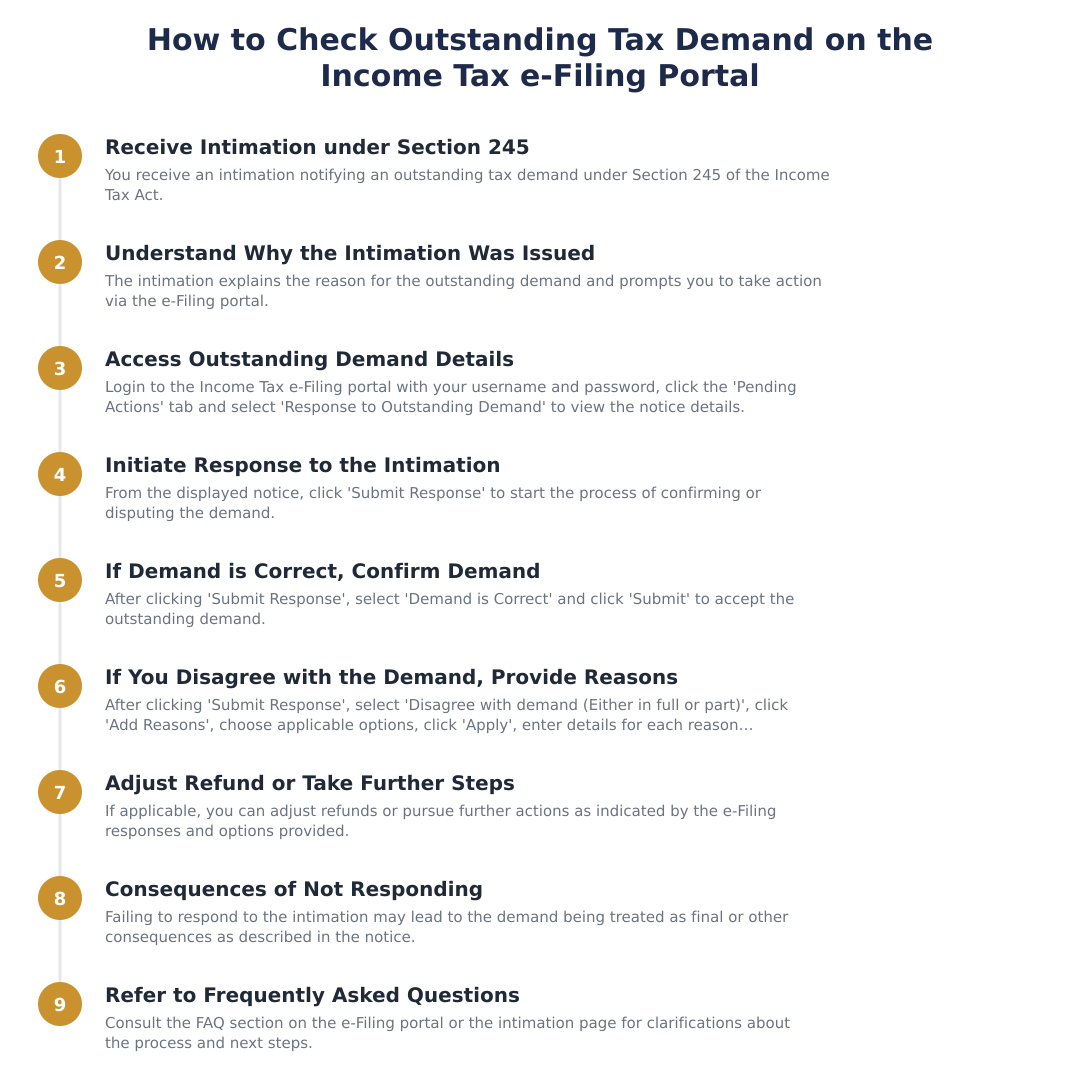
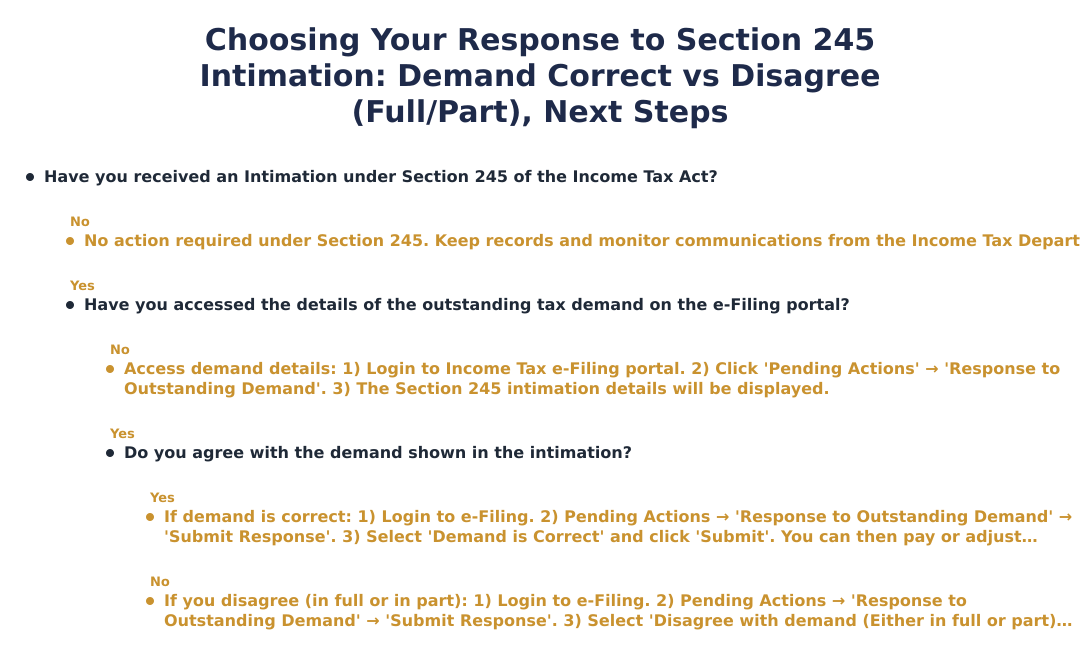
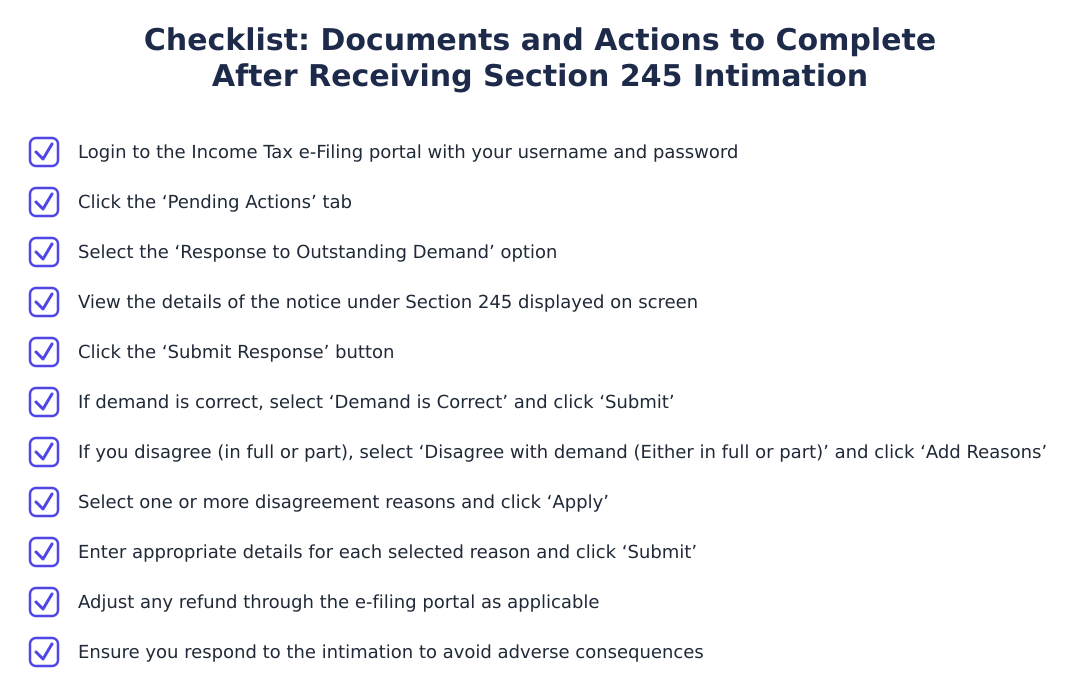
You can view details of outstanding tax demand by logging into the Income Tax e‑Filing portal and accessing the ‘Response to Outstanding Demand’ under ‘Pending Actions’. After login with your username and password, click the ‘Pending Actions’ tab and select ‘Response to Outstanding Demand’ to see the details of the Section 245 notice. The display will show the demand amount(s), assessment year(s), and any refund available for set‑off so you can decide how to respond. If you don’t see the notice, ensure your PAN is linked and your profile is up to date on the portal.
How do I respond on the e‑filing portal if the demand is correct and I accept adjustment?
If the demand is correct, select the ‘Demand is Correct’ option in the ‘Submit Response’ flow on the e‑filing portal and submit that response. To do this login, go to ‘Pending Actions’ → ‘Response to Outstanding Demand’, click ‘Submit Response’, choose ‘Demand is Correct’ and click ‘Submit’. This informs the department you have no objection and allows the AO to proceed with the refund set‑off; no further documentation is required when you accept the demand. Accepting does not waive your right to later pay the balance if the refund is insufficient to cover the demand in full.
How do I disagree with the demand (in full or in part) on the e‑filing portal?
To disagree, choose ‘Disagree with demand (Either in full or part)’ in the ‘Submit Response’ section and provide reasons before submitting on the e‑filing portal. Login, go to ‘Pending Actions’ → ‘Response to Outstanding Demand’, click ‘Submit Response’, select ‘Disagree with demand (Either in full or part)’, click ‘Add Reasons’, pick one or more predefined reasons, click ‘Apply’, fill in details for each selected reason and then click ‘Submit’. Provide concise, factual reasons and attach or retain supporting documents as the AO may ask for evidence to re‑examine the demand. If the grounds are valid, the department may revise or cancel the demand; otherwise the set‑off may proceed after the review.
What happens if I do not respond to the Intimation under Section 245?
If you do not respond to the intimation, the Income Tax Department may proceed to adjust your refund against the outstanding demand as proposed in the notice. Non‑response typically results in automatic set‑off of the refund to satisfy the demand unless statutory or procedural bars apply, and you will lose the opportunity to formally contest before adjustment. You can still pursue dispute remedies after adjustment (such as filing objections or appeals), but it may complicate recovery of any excess set‑off and delay refunds. Therefore it is advisable to respond via the e‑filing portal rather than ignoring the intimation.
Can my refund be partially adjusted against multiple outstanding demands under Section 245?
Yes, your refund can be partially adjusted against one or more outstanding demands under Section 245 until the refund amount is exhausted or the demands are fully satisfied. The intimation will display the demands and the proposed set‑off sequence, and the AO may apportion the refund across multiple assessment years as per rules and priorities. If you disagree with the proposed apportionment, you must submit the disagreement with reasons through the e‑filing portal; otherwise the adjustment will proceed as intimated. Keep track of the remaining demand balances on the portal after adjustment to ensure records are correct.
Where on the e‑filing portal do I submit my response to the outstanding demand notice?
You submit your response on the Income Tax e‑Filing portal under the ‘Pending Actions’ tab by selecting ‘Response to Outstanding Demand’ and then clicking ‘Submit Response’. After login, navigate to ‘Pending Actions’, choose ‘Response to Outstanding Demand’, view the notice details, click ‘Submit Response’, and then select either ‘Demand is Correct’ or ‘Disagree with demand (Either in full or part)’ and follow the prompts to submit. The portal records your response and sends it to the Assessing Officer for processing, so retain screenshots or acknowledgement for your records. If you face technical issues, contact e‑filing helpdesk or your tax professional for assistance.
If I disagree with the demand, what specific steps and options can I select while submitting reasons?
When you disagree, you can pick one or more predefined reasons in the ‘Add Reasons’ screen, click ‘Apply’, and then enter details for each selected reason before submission on the e‑filing portal. After choosing ‘Disagree with demand (Either in full or part)’, the portal lets you select applicable reasons (for example wrong assessment year, computation error, or already paid), you can select multiple reasons, then provide explanatory details and supporting facts and click ‘Submit’. The AO will review your stated reasons and may request evidence or modify the demand; ensure your inputs are clear and match your records. Keep copies of documentary proof ready in case the AO requires them for re‑assessment or cancellation of demand.
Run a service business? See every client's money on one screen.
MoneyGence shows who has paid, who is overdue and by how many days, with GST-ready invoices, bank reconciliation and renewal alerts alongside your Income Tax work. Free for up to 2 clients, no credit card needed.
Start free with 2 clients See how it works →