Leave Encashment Calculator - Calculate Exempt & Taxable Amount
Leave encashment is the payment an employee receives for unused paid leave, either during service or at resignation/retirement, and part of it can be tax-exempt under the Income Tax Act. This guide explains how a leave encashment calculator works and why using one matters for employees who receive money for unused leave. You will learn what leave encashment means, which broad employee categories are considered when calculating exemption and taxable portions, and how an online calculator helps translate inputs (service years, average salary, unused leave) into the exempt and taxable components for Income Tax purposes. The guide is aimed at salaried individuals preparing for resignation or retirement, payroll professionals who need to estimate tax impact, and anyone who wants a clearer view of how leave encashment is treated administratively. Using a calculator reduces manual errors, standardises computations and helps you plan tax provisions or net take-home projections at the time of retirement or during service when leave is encashed. The practical benefit is better cash flow and tax planning, you can see how different inputs (for example, more unused leave or a higher average salary) change the exempt amount versus the portion that will be taxed. Throughout the guide you’ll find concise explanations and a stepwise checklist for using an online leave encashment calculator correctly, so you can run reliable estimates for government and non-government employees.
What is the Leave Encashment Calculator?
A leave encashment calculator is an online tool used to compute the exempted and taxable portions of leave salary for Income Tax purposes. It standardises inputs and applies the rules embedded in the calculator to produce a split between tax-exempt and taxable amounts, making it easier for employees and payroll teams to arrive at consistent results.
Because the calculation can involve multiple inputs, service duration, average salary, number of unused leaves and whether encashment happens during service or at retirement, an online calculator reduces arithmetic mistakes and saves time compared with manual computations.
What is Leave Encashment?
Leave encashment refers to money received by employees at resignation or retirement for unused leaves. It is the payment an employer makes in lieu of granting leave that the employee did not take by the time their service ended or as provided under the employer’s leave policy.
Practically, encashment provides liquidity to the employee instead of carry-forward of leave, and the amount is part of salary income for tax and payroll reporting. How much of the amount is exempt versus taxable depends on rules and the circumstances under which the encashment occurs.
Types of Leaves Eligible for Encashment
Which specific kinds of leave can be encashed, such as earned leave, privilege leave or other categories, depends on the employer’s leave policy and statutory provisions applicable to the employee. Employers typically specify which leave balances are payable on resignation or retirement.
Eligibility and the maximum number of encashable days may differ for government and non-government employees, and may also vary depending on whether encashment happens during service or at the time of retirement. Verify your employer’s policy and the terms of your service contract before relying on an estimate.
How to Use Leave Encashment Calculator?
Choose whether the employee is a Government employee or a Non-government employee; the calculation treats these categories separately.
Select whether the leave is being encashed During Service or At Retirement, as this affects the exempt/taxable outcome.
Provide total years of service; this is used by the calculator to apply any service-related limits.
Input the average salary of the last 10 months; many calculators use this figure as the basis for per-day or monthly salary calculations.
Fill in the number of unavailed leave days that are being encashed so the calculator can compute the gross leave salary.
Provide the normal annual leave entitlement, which may be used to determine per-day salary equivalents or statutory caps within the computation.
Frequently Asked Questions
Who are the employee types considered in the calculator? The calculator considers two broad categories: Government employee and Non-government employee. Selecting the correct category is important because treatment and limits can differ.
What is the core purpose of the online calculator? The leave encashment calculator is an online tool used to calculate exempted and taxable leave salary for Income Tax purposes, helping users get a quick and consistent estimate of tax implications on encashment received at resignation, retirement or during service.
A leave encashment calculator is a practical aid for employees and payroll teams to estimate how much of the payment for unused leave will be exempt and how much will be taxable. Use the checklist above to enter accurate inputs, employee type, timing, service years, average salary, unused leaves and annual entitlement, and confirm results against your employer’s policy or a tax advisor for final reporting.
Frequently asked questions
What is a leave encashment calculator and what does it show?
A leave encashment calculator is an online tool that computes your exempted and taxable leave salary for Income Tax purposes. It shows the cash equivalent of your unused leaves, applies the tax exemption rules (like Section 10(10AA) limits), and provides a breakdown of exempt and taxable amounts; for example, it can calculate that out of Rs 3,20,000 received, Rs 3,00,000 may be exempt and Rs 20,000 taxable. The calculator typically asks for employee type (government/non-government), whether encashment is during service or at retirement, average salary of last 10 months, years of service, and unused leaves to give an accurate result.
How is leave encashment defined for income-tax purposes?
Leave encashment is the money paid by an employer to an employee for accrued but unused leave when they leave service or on retirement. It includes the cash equivalent of earned leave not availed and is treated as salary income for tax, although part or all may be exempt under Section 10(10AA) subject to specified limits and conditions. The tax treatment differs for government and non-government employees and also depends on whether encashment is received during service or at retirement.
Which types of leave are eligible for encashment?
Typically earned leave (also called privilege leave) is eligible for encashment; other paid leave types may be encashed only if company policy permits. The calculator and tax rules generally consider accrued earned leave when computing cash equivalent; casual or sick leave may not be encashable unless the employer’s rules allow it. Always check your employer’s leave policy for permitted encashment categories and confirm which leaves are included in the cash equivalent used for tax computation.
What exemption is available under Section 10(10AA) for leave encashment?
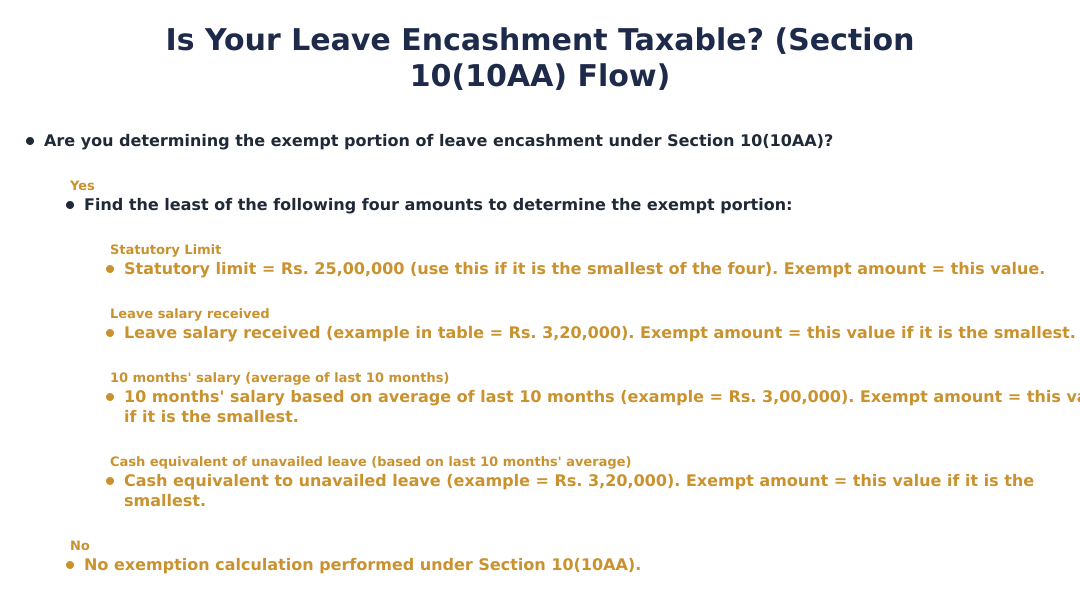
Section 10(10AA) allows exemption of leave salary subject to the least of specified amounts: statutory limit (e.g., Rs 25,00,000 for certain cases), leave salary received, 10 months' salary based on the average salary of the last 10 months, and cash equivalent of unavailed leave based on that average salary. For example, if leave received is Rs 3,20,000 and 10 months’ average salary equals Rs 3,00,000 while the statutory cap is Rs 25,00,000, the exemption will be Rs 3,00,000 and the remaining Rs 20,000 will be taxable. The applicable least-of rule and whether the employee is government versus non-government determine the final exempt amount.
How do you calculate leave encashment exemption step-by-step?
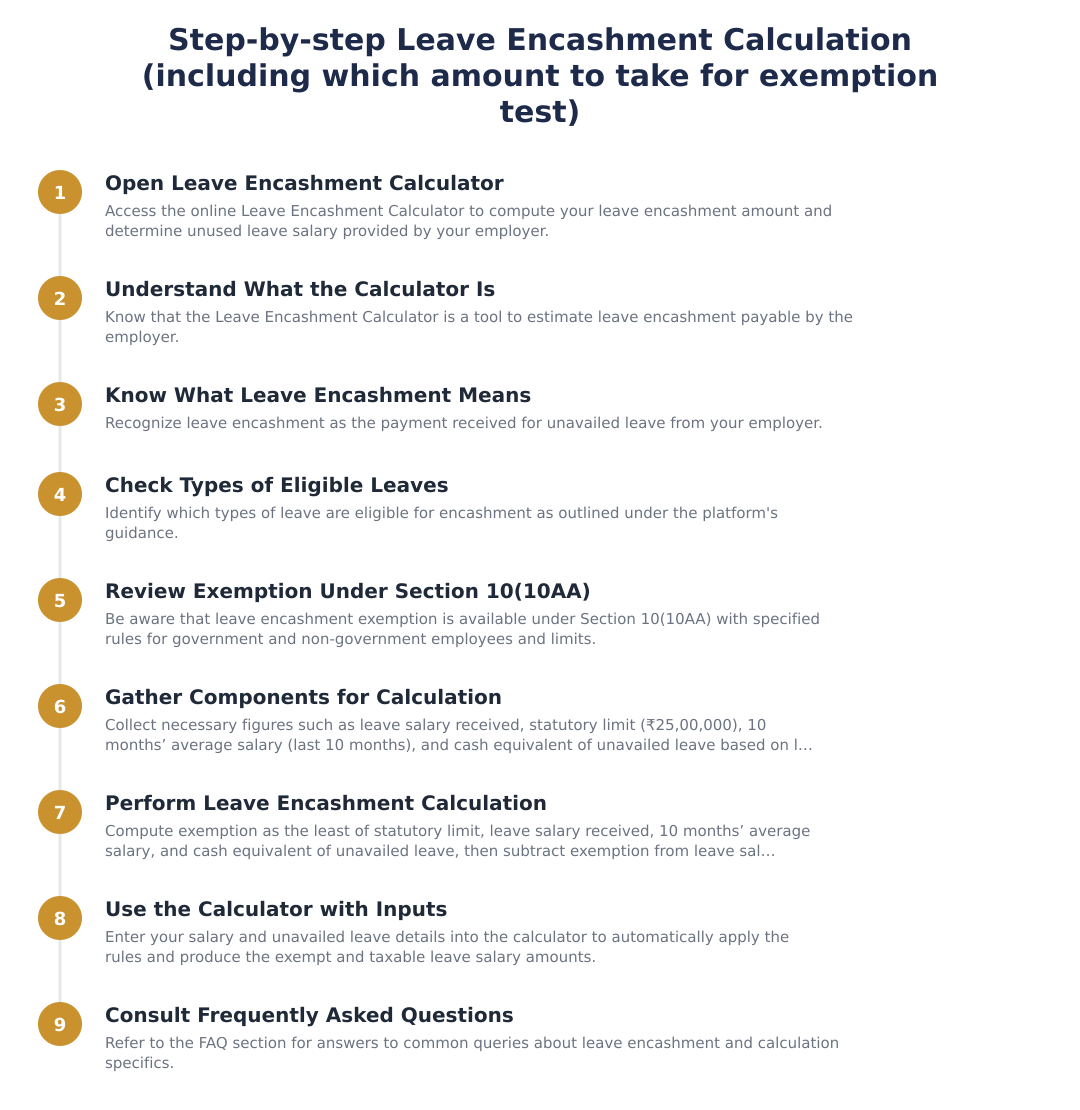
To calculate exemption, determine the cash equivalent of unavailed leave using last 10-month average salary (for example, (Rs 30,000/30)*320 = Rs 3,20,000), compute 10 months’ average salary (e.g., Rs 30,000*10 = Rs 3,00,000), note the leave salary actually received (Rs 3,20,000) and compare these with the statutory limit (e.g., Rs 25,00,000). The exempt amount is the least of these values (here Rs 3,00,000) and taxable leave salary equals total received minus exemption (here Rs 3,20,000 - Rs 3,00,000 = Rs 20,000). Use this least-of method whether encashment is at retirement or during service, applying government/non-government rules as needed.
How do I use the leave encashment calculator on the site?
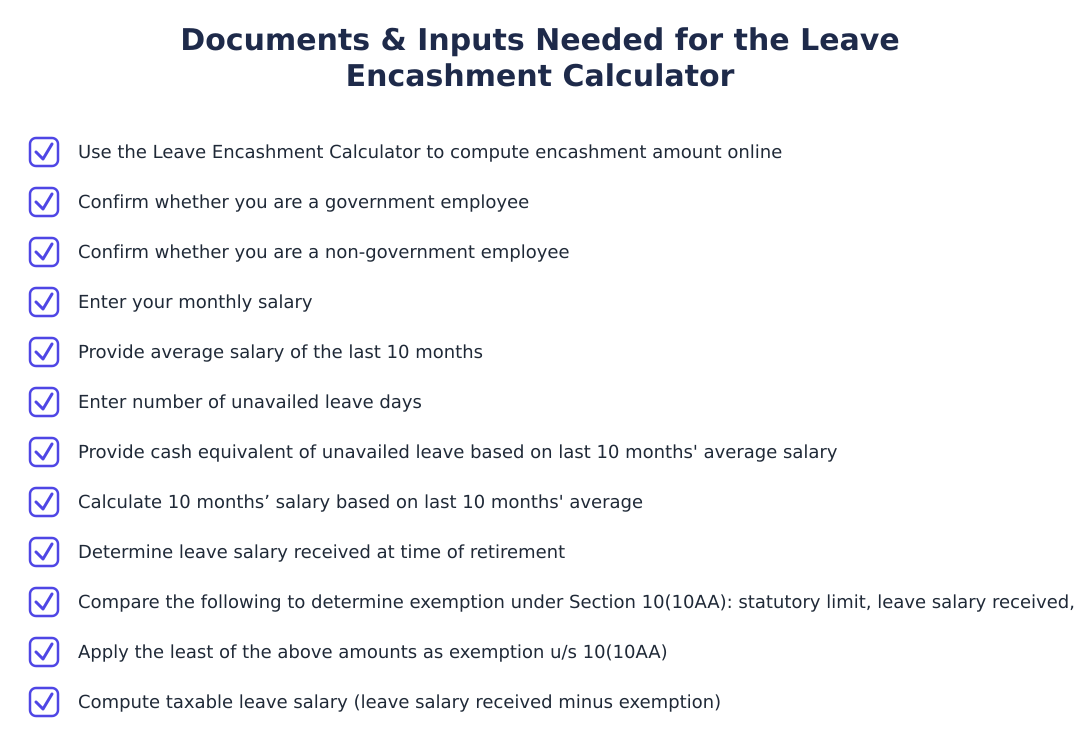
Select employee type (Government or Non-Government), choose whether encashment is 'During Service' or 'At Retirement', and enter years of service without fractional months, average salary of the last 10 months (Basic + DA if included in retirement benefits), number of unused leaves and total leaves allowed per year. After entering these details the calculator will compute the cash equivalent of unavailed leave, determine the exemption under Section 10(10AA) and show taxable amount; it follows the least-of rule (statutory limit, leave received, 10 months’ average, cash equivalent). Keep your salary figures and leave balance ready to get an accurate result and compare the output with employer paystubs.
Is leave encashment taxable if I receive it during service?
Leave encashment received during service may be taxable or exempt depending on the rules and whether Section 10(10AA) limits apply; for non-government employees, exemption rules usually apply only on retirement, while during-service encashment is generally taxable unless your employer’s policy or specific provisions allow exemption. For government employees, leave encashment is often exempt even during service on retirement, but during-service receipts are usually taxable. Always check whether the payment is classified as 'encashment during service' or 'on retirement' and apply the least-of rule to determine exemption where applicable.
What inputs does the leave encashment calculator need to produce correct results?
The calculator requires employee type (government or non-government), whether encashment is during service or at retirement, number of years of service (no fractional months), average salary of last 10 months (Basic + DA if relevant), number of unused leaves available for encashment and total leaves per year. These inputs let it compute cash equivalent of unavailed leave, 10 months’ average salary, and compare against statutory limits (for example Rs 25,00,000) to determine exemption and taxable amounts; incorrect or incomplete inputs will yield wrong results. Keep salary breakup and official leave records ready to ensure accurate calculation.
Run a service business? See every client's money on one screen.
MoneyGence shows who has paid, who is overdue and by how many days, with GST-ready invoices, bank reconciliation and renewal alerts alongside your Calculators work. Free for up to 2 clients, no credit card needed.
Start free with 2 clients See how it works →