Link PAN with Aadhaar Online 2026 – Step-by-Step Guide
This guide explains what PAN–Aadhaar linking means, why it matters for individuals and taxpayers, and practical options to complete the link. You will learn what PAN and Aadhaar are, how they relate to each other, common problems people face when linking them, and clear, step-based approaches you can follow for online and offline linking. The guide focuses on helping you understand the process conceptually, what information you will need, typical pathways to submit a linking request, and how to troubleshoot frequent issues, so you can confidently pursue linking using the official channels. Knowing the basic differences between the two identity numbers, how to prepare documents and contact points for help will reduce delays and rework. This guide is suitable whether you are applying for a new PAN, updating details in your Aadhaar, or simply checking the status of an existing PAN–Aadhaar link. It does not provide legal opinions or cite any court judgments; instead it gives plain-language guidance so you can navigate the administrative steps and make informed choices about updating and reconciling identity data.
PAN–Aadhaar Link Overview
At a basic level, PAN and Aadhaar are two separate identity numbers issued by different authorities for tax and civil identification purposes respectively. PAN is a 10-digit Permanent Account Number and Aadhaar is a 12-digit number. Linking these two helps authorities verify identity and maintain consistent records across tax and welfare systems.
Linking is primarily an administrative exercise: matching demographic details (name, date of birth, gender, address where applicable) and confirming that the two numbers belong to the same person. From the individual’s perspective, a successful link simplifies tax compliance and reduces friction when responding to queries from tax departments or receiving government entitlements that require verified identity.
What is PAN–Aadhaar Linking and Why It Matters
Linking means associating your PAN record with your Aadhaar number in the official databases so that the two records can be cross-checked automatically. The objective is to ensure that a single individual is not operating multiple PANs and to improve accuracy of taxpayer records.
Practically, a linked PAN and Aadhaar can help reduce follow-up queries, speed up verification-based processes, and simplify certain compliance tasks. If there are mismatches in details between the two records, the linking process will flag them and you will need to resolve the discrepancies by updating the relevant record before the association can be completed.
How to Link PAN and Aadhaar Online (Conceptual Steps)
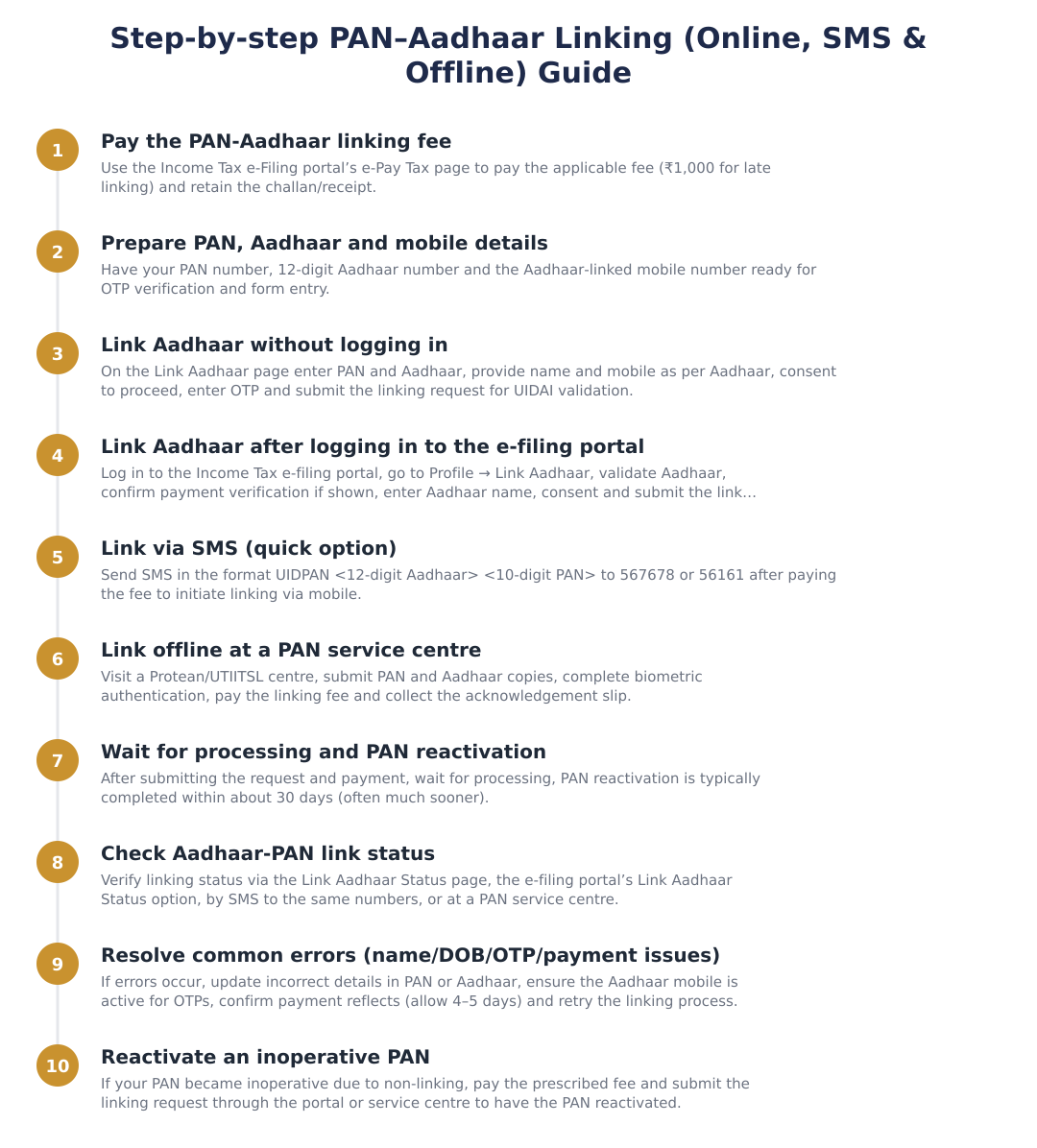
Have your PAN and Aadhaar numbers ready and ensure the demographic details on both documents match as closely as possible (name, date of birth, gender).
Use the government’s designated online portal or the official e-filing website where a Link Aadhaar / Link PAN facility is provided.
Enter your PAN and Aadhaar details, give the required consent for validation, and follow on-screen prompts. The system typically validates details with the Aadhaar database.
You may be required to authenticate using an OTP sent to the mobile number registered with Aadhaar or via another prescribed authentication method.
After submission you should receive an onscreen acknowledgement or receipt. Note or save this for follow-up and status checks.
Fees and Practical Considerations
Some administrative steps connected with late linking, biometric authentication at service centres, or special processing may involve fees. Fee rules and amounts are set by the administering authorities and can change over time, so always check the official e-filing or service-centre guidance before making any payments.
When a payment is required it is normally made through the government’s prescribed payment channels. Keep payment receipts and any acknowledgement numbers safe, as they are useful if you need to follow up with the portal helpdesk or a service centre.
Common Errors, Fixes and Next Steps
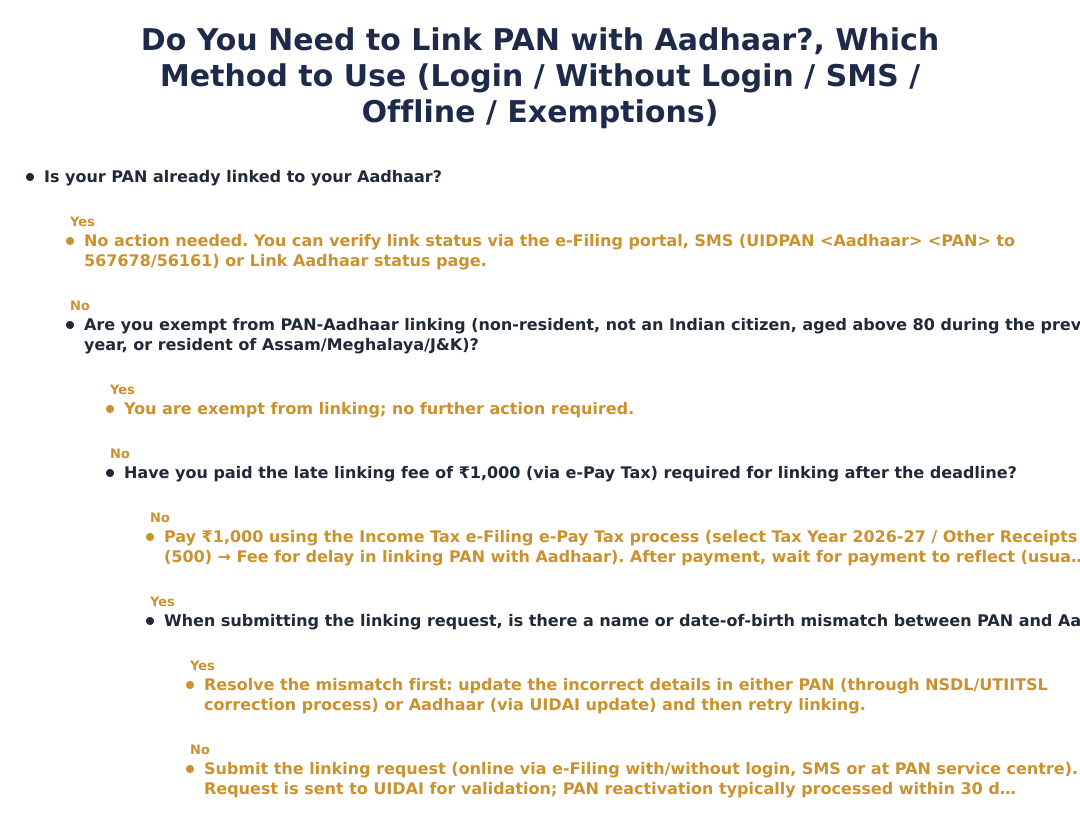
Name or date-of-birth mismatches are among the most common reasons a linking request is rejected. If the details do not match, you will need to update the incorrect details in the relevant record (either PAN or Aadhaar) through the authorised update process and then re-attempt linking.
Other frequent issues include OTP non-delivery (often caused by an inactive mobile number with Aadhaar), incorrect numbers being entered, or delays in payment/verification showing on the portal. Resolving these typically involves verifying the Aadhaar-linked mobile number, re-entering the correct details, waiting for payment reconciliation, or contacting the official portal helpdesk for assistance.
Linking PAN and Aadhaar is fundamentally about ensuring consistent identity data in government records. Prepare by checking that the PAN and Aadhaar details match, use the official online facility or authorised centres for submission, keep receipts and acknowledgements, and follow prescribed update routes if corrections are needed. If problems persist, contact the official help channels for the PAN or Aadhaar systems for case-specific support.
Frequently asked questions
What does it mean to link my PAN with my Aadhaar?
Linking PAN with Aadhaar means associating your 10-digit PAN with your 12-digit Aadhaar so both records match for the same person. This is required under the Income Tax Act, 2025 to avoid duplicate PANs and help the tax department track financial transactions; it prevents tax refunds being withheld and stops higher TDS/TCS rates from applying when PAN is inoperative. The process is done through the Income Tax e‑Filing portal, by SMS or at PAN service centres and involves UIDAI validation of details like name and date of birth. Individuals who obtained PAN using an Aadhaar Enrolment ID had specific earlier deadlines but can still link by paying the prescribed late fee.
How much does it cost to link PAN with Aadhaar in 2026?
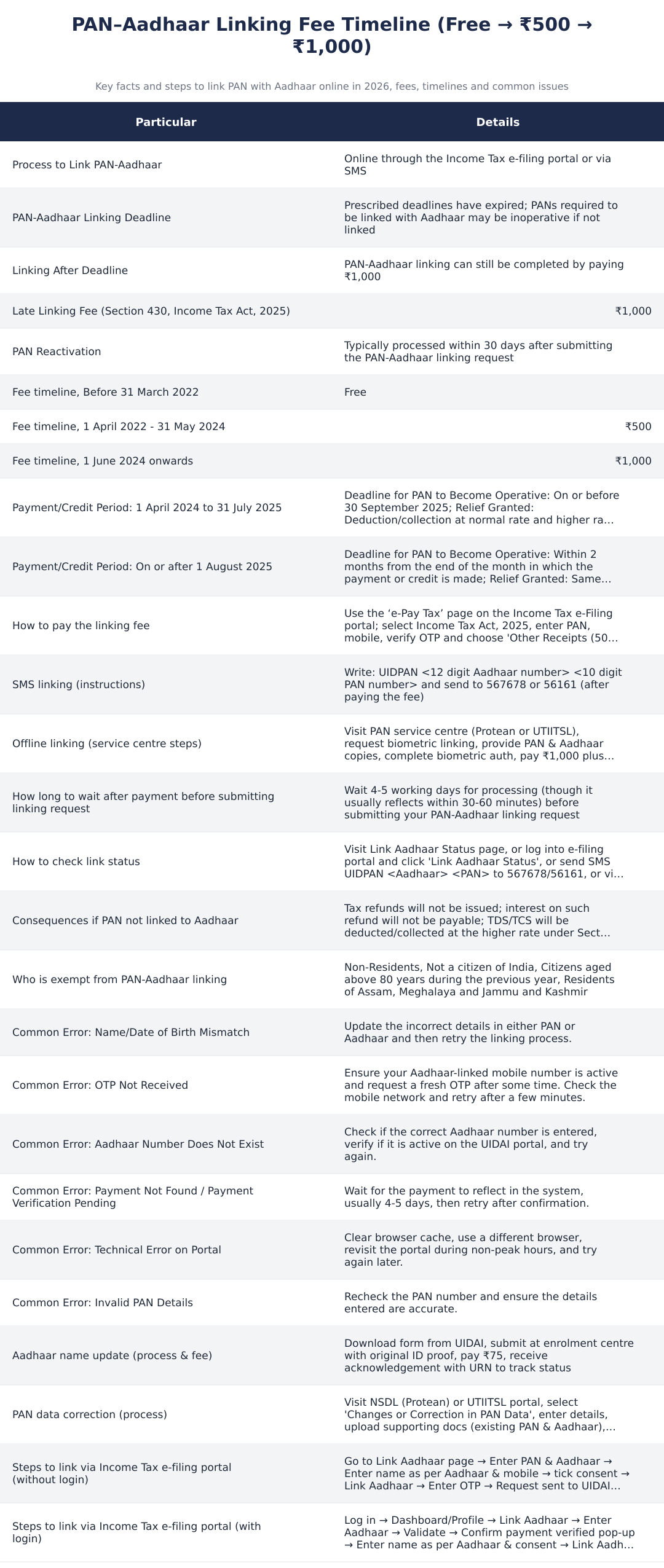
The fee to link PAN with Aadhaar from 1 June 2024 onwards is ₹1,000. Earlier slabs were free before 31 March 2022 and ₹500 between 1 April 2022 and 31 May 2024, but the current applicable charge to regularize late linking is ₹1,000 under Section 430 of the Income Tax Act, 2025. You must pay this amount through the e‑Pay Tax facility on the Income Tax e‑Filing portal and retain the challan/receipt for subsequent linking steps. Note that some service centres may levy additional biometric or service charges if you link offline.
How can I link PAN and Aadhaar online without logging in to the e‑filing portal?
You can link PAN and Aadhaar without logging in by going to the Link Aadhaar page on the Income Tax e‑Filing portal and entering your PAN, Aadhaar number, name as per Aadhaar and mobile number, then validating by OTP. If the portal shows ‘Payment details not found’, you must click ‘Continue to Pay Through e‑Pay Tax’ to pay the required fee and wait 4–5 working days (though sometimes much faster) for the payment to reflect before final submission. After UIDAI validation via OTP, the linking request is processed and the status can be checked on the portal or via SMS. Keep your Aadhaar‑linked mobile active to receive OTPs.
How do I link PAN and Aadhaar online after logging into the Income Tax e‑Filing portal?
After logging into the e‑Filing portal, go to Profile > Link Aadhaar (or Personal Details > Link Aadhaar), enter your Aadhaar number and click Validate, then confirm your name as per Aadhaar and give consent before submitting via OTP validation. If payment has already been made, the portal will show a pop‑up ‘Your payment details are verified’; otherwise it will prompt you to pay via e‑Pay Tax and continue after payment clears (usually 4–5 days). The request is then sent to UIDAI and, once validated, PAN is reactivated typically within 30 days though many cases update within minutes to hours. Ensure your Aadhaar mobile number is active to receive OTPs.
Can I link PAN with Aadhaar by SMS and how do I do it?
Yes, you can link PAN with Aadhaar by SMS after paying the ₹1,000 fee: send UIDPAN <12‑digit Aadhaar> <10‑digit PAN> to either 567678 or 56161. Before sending SMS you must complete the e‑Pay Tax payment and keep the challan/receipt; the SMS option triggers the linking request which is validated by UIDAI. If payment hasn't been recorded in the linking system, the SMS may prompt you to complete payment first and you should wait 4–5 working days for the payment to reflect. SMS linking requires the Aadhaar number and PAN to be correctly entered and the Aadhaar‑linked mobile to be active for any OTPs or confirmations.
How do I link PAN and Aadhaar offline at a PAN service centre?
You can link PAN and Aadhaar offline by visiting an NSDL (Protean) or UTIITSL PAN service centre, submitting copies of PAN and Aadhaar, completing biometric authentication and paying the ₹1,000 linking fee plus any service charges. The centre will process Aadhaar biometric authentication and give you an acknowledgement slip; make sure to collect and retain that receipt. Offline linkage is useful if your Aadhaar mobile number is inactive or you cannot complete OTP verification online, but service centres may charge extra for biometric capture. After submission the linking request is validated with UIDAI and the PAN usually becomes operative within the standard processing time.
How long does PAN reactivation take after linking it with Aadhaar?
PAN usually becomes operative within 30 days after submitting the PAN‑Aadhaar linking request, though many cases show validation and reactivation within 30–60 minutes to a few days. If you paid the late linking fee, allow 4–5 working days for the payment to reflect in the system before final submission or status update, and some delays may occur due to technical or validation issues. If reactivation takes longer than 30 days, check the Link Aadhaar status page, your e‑filing dashboard, send an SMS for status, or contact the PAN service centre where you applied. Keep the e‑Pay Tax challan and acknowledgement handy if you need to follow up.
What happens if I don’t link PAN with Aadhaar by the deadline?
If you don’t link PAN with Aadhaar by the prescribed deadlines, your PAN may be declared inoperative which results in tax refunds being withheld, no interest on withheld refunds, and TDS/TCS being deducted or collected at higher rates under Section 397(2) of the Income Tax Act, 2025. You can still link your PAN after the deadline by paying the late fee (currently ₹1,000) to reactivate the PAN, but certain pre‑2026 deadlines had earlier cutoff dates for specific categories. To avoid higher TDS/TCS and blocked refunds, complete the linking and payment process promptly and keep proof of payment for follow up.
What should I do if my name or date of birth doesn’t match between PAN and Aadhaar?
If name or date of birth mismatches occur, update the incorrect details either in PAN (via NSDL/UTIITSL correction form) or in Aadhaar (Aadhaar update at UIDAI) and then retry the linking process. For Aadhaar name updates, download the Aadhaar Update Form from UIDAI, submit at an enrolment/update centre with supporting ID and pay ₹75 for a name update; PAN corrections are done via the Protean or UTIITSL portals with supporting documents and fee. After the correction is processed and reflected online, you can complete the PAN‑Aadhaar linking; minor spelling differences sometimes pass validation but major mismatches will block linking. Keep acknowledgement URNs and correction receipts to show during linking or follow up.
Need help staying Income Tax compliant?
MoneyGence's AI Finance OS tracks your compliance, wallet share, and finances in one place, built for agencies and growing businesses.
Get started with MoneyGence