Salary Calculator – Free CTC to In-Hand & Monthly Breakup
A salary calculator helps you convert a Cost-to-Company (CTC) or gross salary into an estimated in-hand pay by applying statutory and common workplace deductions. This guide explains what a salary calculator does, the typical salary components it recognises in India, how those components are treated for tax and deduction purposes, and how to use a calculator to compare offers or plan your budget. You will also see a worked example produced by a calculator and learn which parts of your pay are typically taxable or exempt. Understanding these points matters because employers present compensation in different formats (CTC, gross, or net), and small differences in allowances, EPF contributions, or state-level levies like professional tax can materially change your monthly cash flow. The calculator does the number-crunching for you, splitting salary into basic, allowances, employer and employee contributions, and showing gross pay, total deductions and net take-home, so you can negotiate better, plan taxes, and prepare a realistic budget. This guide sticks to commonly used rules and sample outputs from salary calculators; it explains why certain allowances may be exempt or taxable and shows how EPF and pension diversion are handled in the computation.
What Is Salary Calculator?
A salary calculator is an online tool that translates your CTC or gross salary into an estimated monthly or yearly take-home amount. It typically breaks compensation into components such as basic pay, house rent allowance, leave travel allowance, special allowances, bonuses and statutory contributions, then applies the relevant deductions to arrive at net pay.
Beyond simple arithmetic, a reliable salary calculator recognises tax treatment and statutory rules for common components. For example, it will treat certain allowances as exempt when conditions are met and include employee and employer provident fund contributions when computing deductions. The purpose is to give employees clarity on how much money will actually reach their bank account and to allow apples-to-apples comparisons between different offers.
Salary Break-up Details in India
Salary is typically split into fixed and variable components. Fixed components include basic salary and statutory employer contributions; allowances such as House Rent Allowance (HRA) and Leave Travel Allowance (LTA) are common and have specific tax treatments. HRA can be partially or fully exempt from tax under Section 10(13A) when the employee satisfies the conditions for claiming it. LTA is exempt under Section 10(5) but only when claimed with appropriate travel proof.
Other parts of salary are clearly taxable: special allowance is a fully taxable component, and bonuses, being performance incentives and part of gross salary, are also fully taxable. Provident fund contributions are treated separately: both employee and employer typically contribute 12% of the basic salary to EPF, and the employee’s EPF contribution is eligible for deduction under Section 80C. A portion of the employer’s EPF contribution (8.33%) is diverted to the Employee Pension Scheme (EPS). Professional tax is a state levy and varies by state.
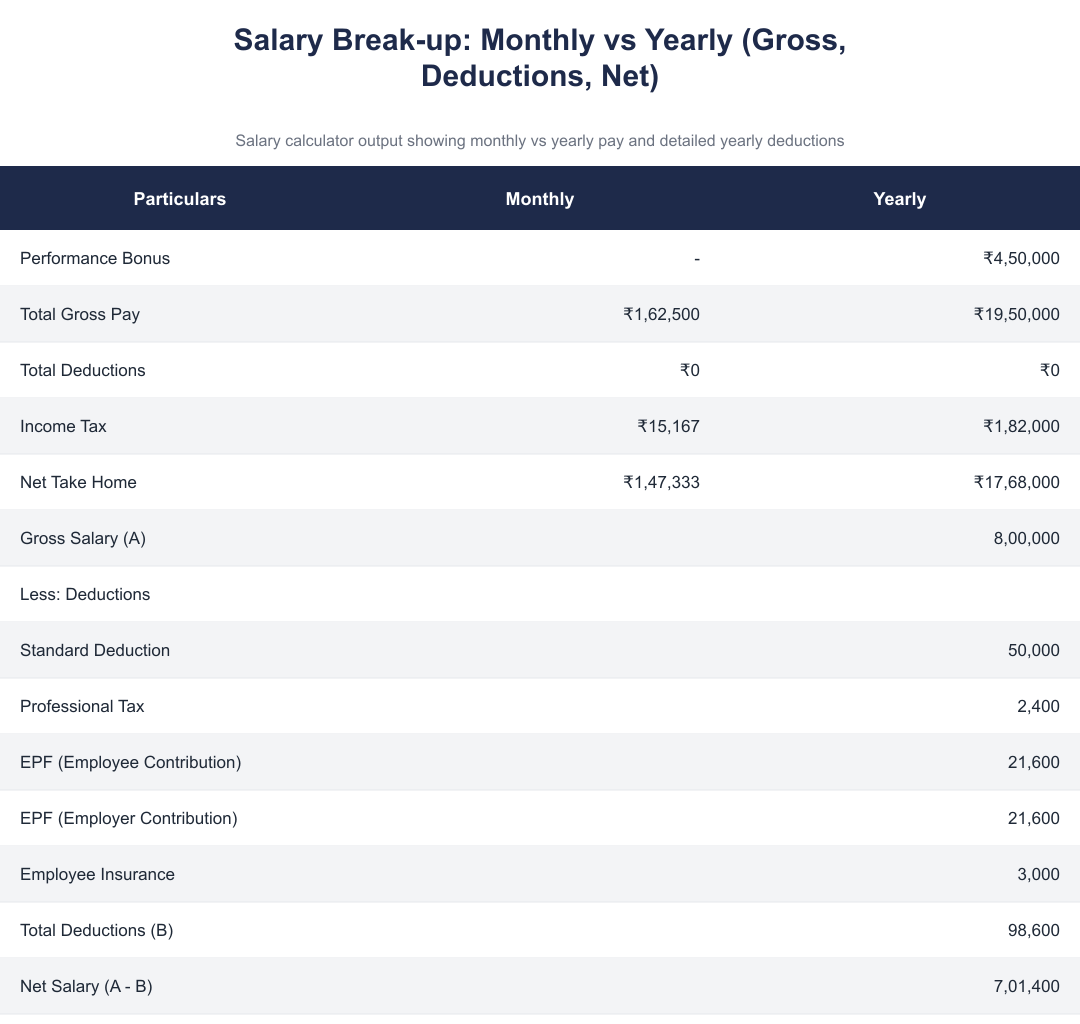
Example Salary Computation (Calculator Output)
| Particulars | Monthly | Yearly |
|---|---|---|
| Performance Bonus | - | ₹4,50,000 |
| Total Gross Pay | ₹1,62,500 | ₹19,50,000 |
| Total Deductions | ₹0 | ₹0 |
| Income Tax | ₹15,167 | ₹1,82,000 |
| Net Take Home | ₹1,47,333 | ₹17,68,000 |
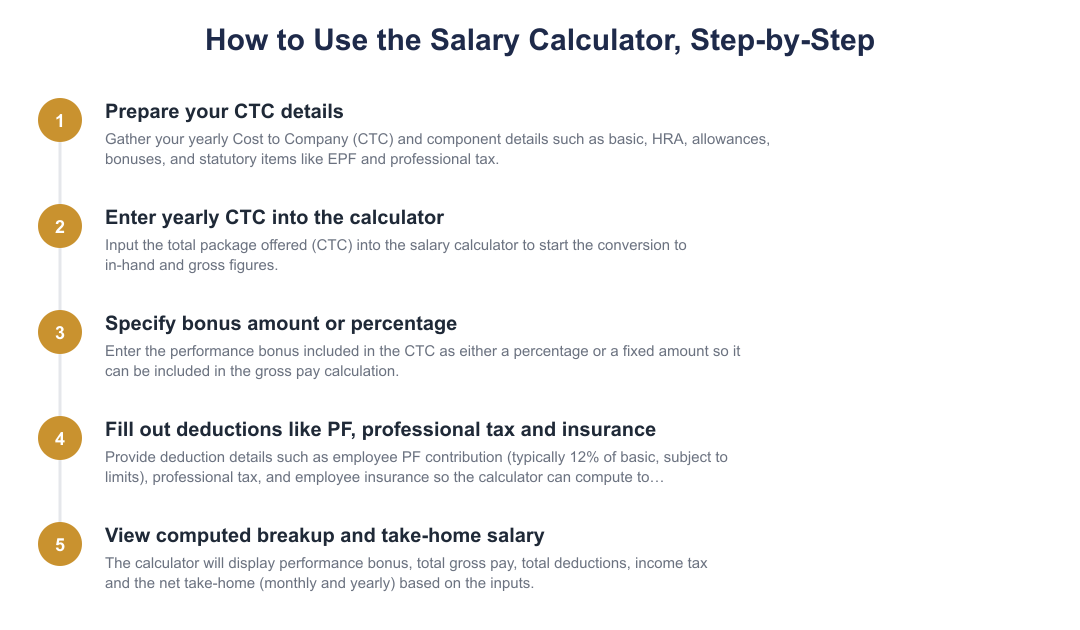
How To Use Salary Calculator?
Provide the total Cost-to-Company or gross annual salary so the calculator has the base amount to split into components.
Specify any performance bonus included in the CTC either as a percentage or as a fixed amount so the calculator can allocate it to the gross pay.
Add deductions such as EPF contribution, professional tax and any insurance amounts. The calculator will use these to compute total deductions.
The calculator displays performance bonus, total gross pay, total deductions (professional tax, employer and employee PF, insurance) and the net take-home pay for monthly and yearly views.
Formula For Salary Calculator
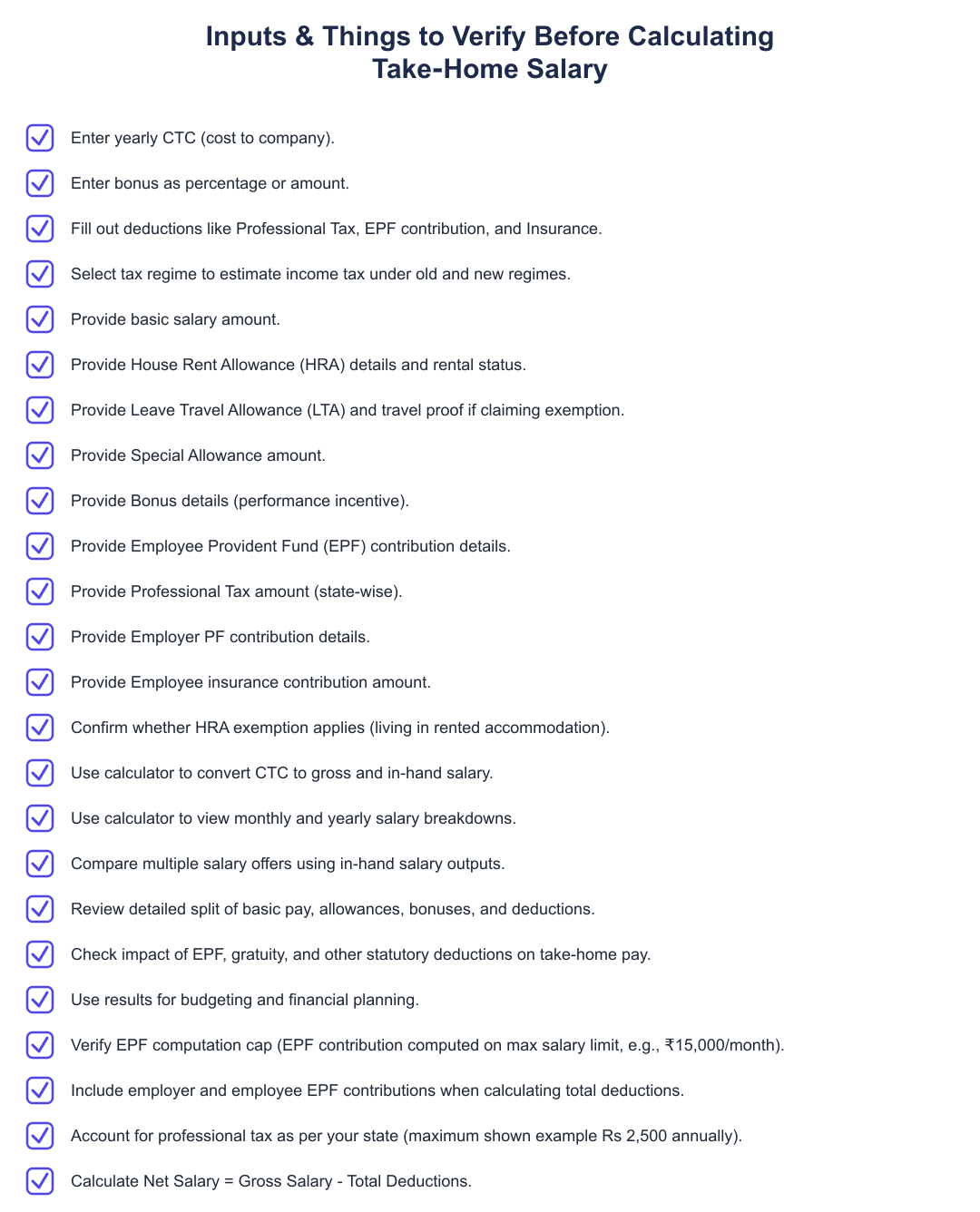
At a conceptual level, the salary calculator converts CTC into gross salary, subtracts allowed deductions and statutory contributions, and presents the resulting net take-home. Deductions commonly include professional tax (a state-levied charge), employee provident fund contributions (employee share) and employer provident fund and insurance amounts. The calculator aggregates these to arrive at Total Deductions and subtracts that from Gross Salary to show Net Salary.
The tool often uses common computation examples to illustrate deductions. For instance, when EPF is computed on a Rs 15,000 monthly basic, an employee contribution of 12% equals Rs 1,800 per month. The employer’s PF contribution also follows the 12% rule on basic, and 8.33% of the employer’s contribution is diverted to the Employee Pension Scheme. These sample computations help users understand how PF and pension diversion affect take-home pay.
Benefits Of Salary Calculator
A calculator gives clarity on the split between gross and net pay, so you can budget accurately and understand how much of your compensation reaches you after statutory contributions and taxes. It also helps in comparing different offers by converting varied compensation formats into a comparable in-hand amount.
Salary calculators can support tax planning by showing which allowances are exempt when conditions are met (for example, HRA and LTA) and which are fully taxable (for example, special allowance and bonus). They also show the impact of EPF contributions, employer pension diversion and state-level professional tax on your monthly cash flow, enabling better negotiation and financial decisions.
A salary calculator is a practical tool to demystify your CTC and understand your real take-home pay. By recognising tax-exempt allowances like HRA and LTA (when conditions are met), treating special allowance and bonus as taxable, and accounting for EPF and state professional tax, the calculator gives you a clearer picture for budgeting, comparison and negotiation.
Frequently asked questions
What is a salary calculator and what does it show?
A salary calculator is a tool that converts your CTC or gross pay into your in-hand (net) salary after statutory deductions. It breaks down components like basic pay, HRA, special allowance, performance bonus, employer and employee EPF contributions, professional tax and estimated income tax under old/new regimes. For example, a calculator can show monthly gross pay of ₹1,62,500 and monthly net take-home of ₹1,47,333 after income tax of ₹15,167. It also displays yearly aggregates (e.g., gross ₹19,50,000 and net ₹17,68,000) so you can budget and compare offers easily.
How do salary components like Basic, HRA and Special Allowance work?
Basic salary is typically 40%–50% of your total salary and is the fixed part of the CTC used to calculate PF and other benefits. House Rent Allowance (HRA) is given to those in rented accommodation and can be partly or fully exempt under Section 10(13A) if you have rent proofs; if you live in owned accommodation HRA is fully taxable. Special allowance and bonuses are generally fully taxable, while some components such as employer EPF contribution and certain reimbursements have different tax treatments or limits.
How does EPF affect my take-home salary?
EPF reduces your take-home salary because both you and your employer contribute 12% of basic salary (employee contribution is deductible under Section 80C). EPF contributions are computed on a maximum salary limit of ₹15,000 per month for standard calculations, so 12% of ₹15,000 equals ₹1,800 monthly or ₹21,600 yearly as the employee contribution (and a similar amount by the employer). Part of the employer contribution (8.33%) goes to the employee pension scheme; these employer contributions also appear in the deduction summary when estimating net salary.
What professional tax amount should I expect and does it vary by state?
Professional tax is a state-level charge and varies across states, with a common maximum annual charge of ₹2,500; for example, Karnataka’s professional tax is shown as ₹2,400 per year in sample calculations. Your salary calculator will deduct the applicable state professional tax from gross pay to arrive at net pay, and that deduction changes based on where your employer is registered. If your state levies no professional tax, the deduction will be zero and your take-home will be correspondingly higher.
What formula does the salary calculator use to compute net salary?
The calculator computes net salary as Net Salary = Gross Salary − Total Deductions, where Total Deductions include employee EPF contribution (12% of basic, capped by the ₹15,000 basis for standard calculations), professional tax, income tax and any insurance contributions. It also shows gross salary components and employer contributions (e.g., employer EPF) separately for clarity; example deductions in a sample give total deductions of ₹98,600 yearly against a gross of ₹8,00,000 leaving a net of ₹7,01,400. The tool may estimate income tax under old and new regimes and include performance bonus separately when converting CTC to in-hand pay.
How do I use the salary calculator to find my take-home pay?
To use the calculator, enter your yearly CTC, specify any bonus (amount or percentage), and fill in deductions like EPF contribution, professional tax and insurance if required. The calculator will display monthly and yearly breakups including performance bonus, total gross pay, total deductions and net take-home; for instance it may show monthly gross ₹1,62,500, monthly income tax ₹15,167 and monthly net ₹1,47,333. This lets you compare offers, plan budgets and see how changes (higher PF, different tax regime) affect your in-hand salary.
Can a salary calculator help with tax planning between old and new tax regimes?
Yes, many salary calculators estimate income tax under both the old and the new tax regimes so you can compare which yields a lower tax liability and higher take-home. They include standard deduction (e.g., ₹50,000) and allow for 80C deductions like employee EPF to show how these affect tax under the old regime, while the new regime calculations exclude most exemptions and deductions. By comparing the net take-home under each regime the tool helps you pick the tax option that maximises your in-hand pay.
Will the calculator show employer contributions like employer EPF and gratuity?
Yes, the salary calculator typically shows employer-side benefits separately, such as employer EPF contribution (often equal to ₹21,600 yearly if using the ₹15,000 cap) and employer allowances that are part of CTC but not part of monthly in-hand cash. These employer contributions are included in the CTC and gross pay figures so you can see the full cost-to-company versus your actual pay; they are shown alongside employee deductions so you understand which amounts reduce your take-home. Note that some employer contributions are not taxed in your hands immediately but affect long-term benefits and tax treatment.
What practical benefits do I get from using a salary calculator?
A salary calculator helps with accurate budgeting by estimating take-home pay after taxes and statutory deductions so you can plan monthly expenses and savings effectively. It gives negotiation leverage by converting CTC to in-hand figures and highlighting the impact of EPF, tax and bonuses so you can compare job offers on a like-for-like basis. It also aids decision-making and financial planning by showing how changes in components (like higher basic or different tax regime) alter your net pay and annual tax outgo.
Run a service business? See every client's money on one screen.
MoneyGence shows who has paid, who is overdue and by how many days, with GST-ready invoices, bank reconciliation and renewal alerts alongside your Calculators work. Free for up to 2 clients, no credit card needed.
Start free with 2 clients See how it works →