How to Track Client-Wise Revenue: A Practical Guide for Agencies and Service Businesses in India
Most agencies track total revenue but not revenue by client - which hides exactly the problems that matter: concentration risk, which clients are actually profitable, and where collections are slipping. Here's how to set up real client-wise
Most agencies and service businesses in India run their books off one number: total monthly revenue. It's the number in the founder's WhatsApp status update, the one on the dashboard, the one that looks fine right up until it doesn't. The problem is that total revenue is an average, and averages hide exactly the things that matter - which clients are actually paying on time, which ones are quietly eating your margin, and how much of your business sits on two or three accounts that could walk away next quarter.
Client-wise revenue tracking is the fix. It's not complicated in concept - you're just recording revenue against a client ID instead of a general ledger line - but almost no one sets it up properly until a client concentration problem or a cash crunch forces the question.
Why "Total Revenue" Isn't Enough
Two agencies can both show ₹40 lakh in monthly revenue and be in completely different positions. One has it spread across 15 clients, none over 15% of the total. The other has 60% sitting with a single client who pays 45 days late. The P&L looks identical. The risk doesn't.
This matters more for services than product businesses, because service revenue is lumpy by nature - retainers renew, projects end, scopes change mid-engagement - and none of that shows up if you're only looking at a single monthly total.
What Client-Wise Revenue Tracking Should Actually Show
At minimum, for every active client, you want to see three numbers side by side, every month:
- Revenue booked - what you've invoiced or accrued for work delivered
- Revenue collected - what's actually hit your bank account
- Outstanding - the gap between the two, and how old it is
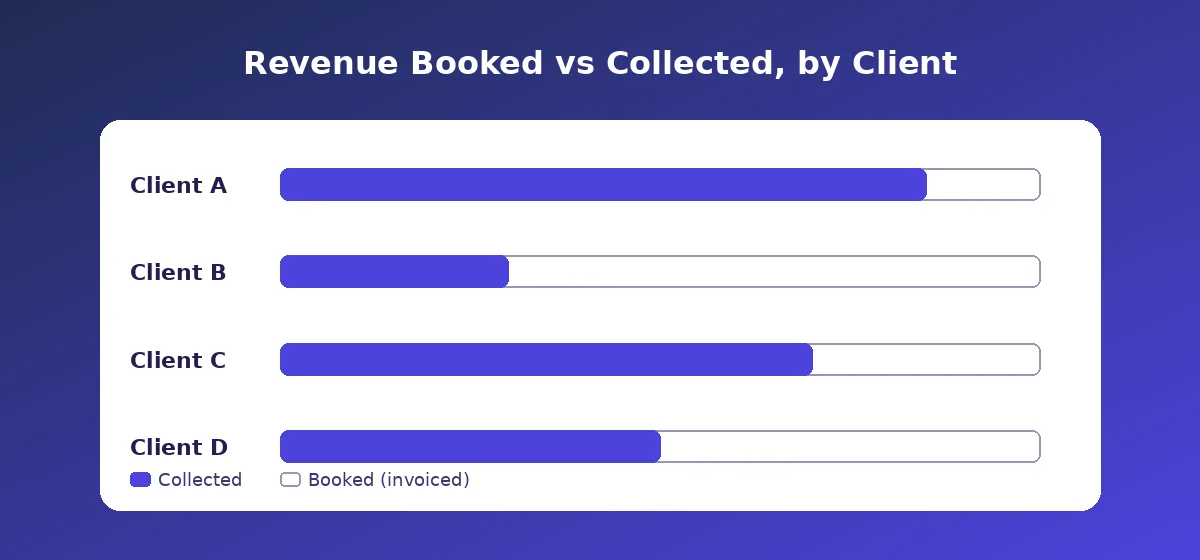
The gap between booked and collected is where agencies actually lose money - not from bad clients refusing to pay, but from good clients paying late enough that it distorts your cash position without anyone noticing until it's a problem.
Three Ways Agencies Actually Do This (and Where Each One Breaks)
The spreadsheet
Almost everyone starts here - a tab per client or a pivot table off your invoice log. It works fine up to roughly 10-15 active clients with simple, similar billing (all retainers, say). It breaks down once you mix billing models: retainers, fixed-scope projects, and hourly work don't sit cleanly in the same columns, and someone has to manually update it, which means it's usually a week or two stale by the time anyone looks at it.
General accounting software (Tally, Zoho Books, QuickBooks)
These are built for statutory books - GST returns, P&L, balance sheet - not for a client-level operating view. You can tag invoices to a customer, but pulling a clean "booked vs collected, by client, this month" report usually means exporting to Excel and rebuilding it yourself, every time.
Purpose-built client-visibility tools
A newer category of tools sits on top of (or alongside) your accounting software specifically to answer the client-level question: who owes what, who's paid, who's trending late, and how concentrated your revenue really is. MoneyGence is one of these - built specifically for Indian service businesses that need this view without rebuilding a spreadsheet every month.
Setting It Up: A Practical Sequence
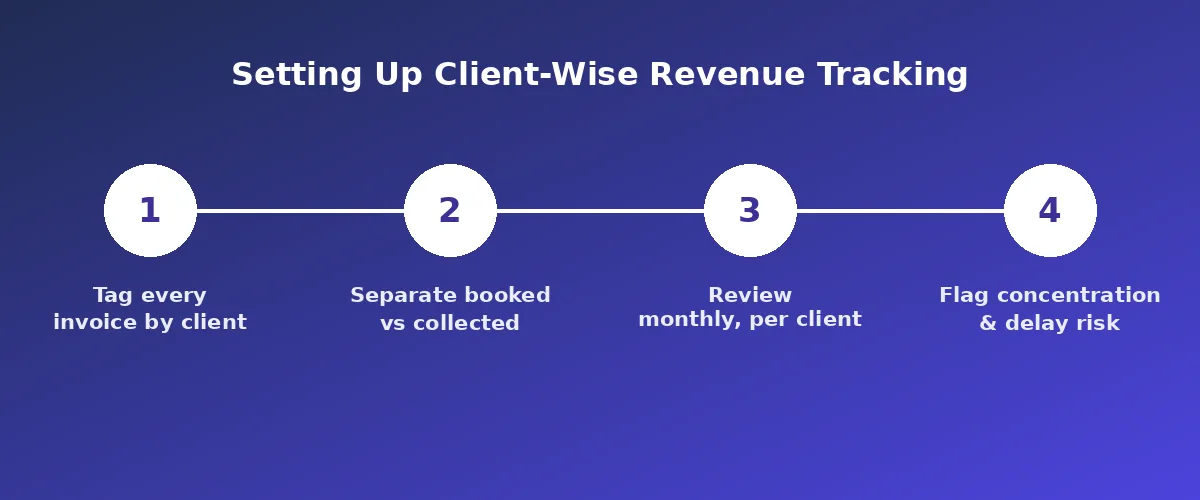
- Tag every invoice with a client code, not just a client name - names get typed inconsistently ("Acme", "Acme Pvt Ltd", "ACME"), and inconsistent tagging is the single most common reason client-wise reports break silently.
- Separate booked from collected for every client, every month. Don't let "invoiced" stand in for "paid" anywhere in your reporting - that gap is the whole point of doing this.
- Review it monthly at minimum, weekly if you have more than 20 active clients or any client above 20% of revenue.
- Set a concentration threshold - a common rule of thumb is flagging any single client above 20-25% of total revenue for a conversation about diversification, not panic.
- Track days-outstanding per client, not just in aggregate. A company-wide "average 30 days to collect" can hide one client who's 90 days out dragging up the average while everyone else pays on time.
Common Mistakes
- Tracking revenue by project instead of by client. Useful for project margins, but it hides the client-level picture - a client can run five profitable small projects and one that loses money, and project-level views won't show you the net client relationship.
- Treating "invoiced" as done. This is the most common one. An invoice raised isn't revenue in your pocket, and treating it as such is how agencies end up cash-poor while looking profitable on paper.
- Only checking client concentration when something goes wrong. By the time a top client churns and you notice the hole it leaves, it's too late to have diversified around it.
- No consistent client ID system. If finance, sales, and delivery all refer to the same client differently across tools, your reports will quietly undercount.
Frequently Asked Questions
What's the difference between client-wise revenue and client profitability?
Client-wise revenue tracks what a client bills and pays you. Client profitability goes a step further and nets out the cost of serving that client - hours spent, team allocated, tools used - to show what you actually earn from the relationship. Revenue tracking is the simpler, faster win; profitability tracking is the deeper one. Most agencies should get revenue tracking solid first.
How often should I review client-wise revenue?
Monthly at minimum. If you have more than 20 active clients, or any single client above 20% of revenue, weekly review of at least the outstanding/collections view is worth the extra effort.
Can I do this in Excel, or do I need software?
Excel works fine for a small number of clients with simple, similar billing structures. It tends to break down once you mix retainers, projects, and hourly billing, or once updating it manually becomes a recurring weekly task nobody owns.
What counts as dangerous client concentration?
There's no universal number, but many agencies use 20-25% of total revenue from a single client as a threshold for actively planning diversification, and treat anything above 30-40% as a real business risk worth addressing directly.
This is the first layer of financial visibility every service business needs before attempting full client profitability. If you're still tracking this manually, see our guide on Bookkeeping in Excel: Step-by-Step System for Small Businesses for a practical starting system, and Bookkeeping vs Accounting: Key Differences Explained if you're deciding how much of this to handle in-house versus hand to an accountant.
Official references
Run a service business? See every client's money on one screen.
MoneyGence shows who has paid, who is overdue and by how many days, with GST-ready invoices, bank reconciliation and renewal alerts alongside your Accounting work. Free for up to 2 clients, no credit card needed.
Start free with 2 clients See how it works →