How To Get TAN Number: Apply, Download TAN Certificate & Track
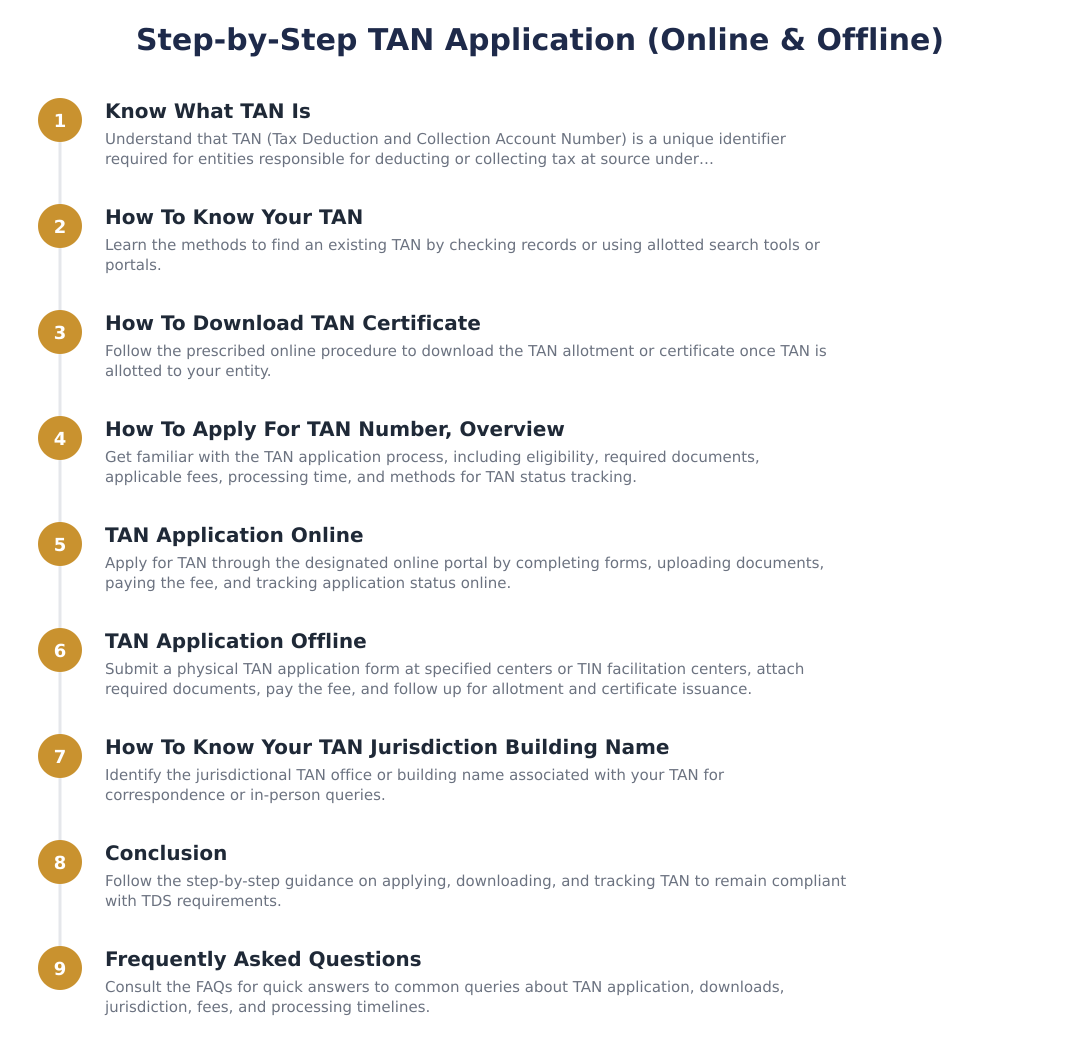
This guide explains everything a taxpayer or business needs to know about TAN, the Tax Deduction or Collection Account Number, why it matters, and the practical options for obtaining and retrieving your TAN details. You will learn what TAN is, who must have it, the format of the TAN, why it must be quoted on statutory TDS/TCS documents, and the two available application routes. The guide also covers how to know your TAN if you have misplaced it, how to download or obtain a TAN certificate, and what to consider about jurisdiction information. Whether you are a business that deducts tax at source, an individual responsible for making payments subject to TDS/TCS compliance, or an accountant helping clients, this article will orient you to the core concepts and procedural choices. The content focuses on the rules around TAN issuance and quoting responsibilities, and on the fact that applications can be made both online and offline, so you can decide which route suits your organisation’s setup. Practical explanations here will help you understand where TAN is required (returns, challans, payments and certificates) and why keeping TAN records and the TAN certificate accessible is important for smooth compliance and record-keeping.
What Is TAN Number?
TAN stands for Tax Deduction or Collection Account Number. It is a permanent identifier used in the context of tax deduction at source (TDS) and tax collection at source (TCS). The TAN is designed to uniquely identify the person or entity responsible for deducting or collecting tax.
The TAN is issued by the Income Tax Department and is a 10-digit alphanumeric number. Because it is used across returns, challans, payments and certificates related to TDS and TCS, the TAN serves as an important linkage tool in tax administration and compliance tracking.
How To Know Your TAN?
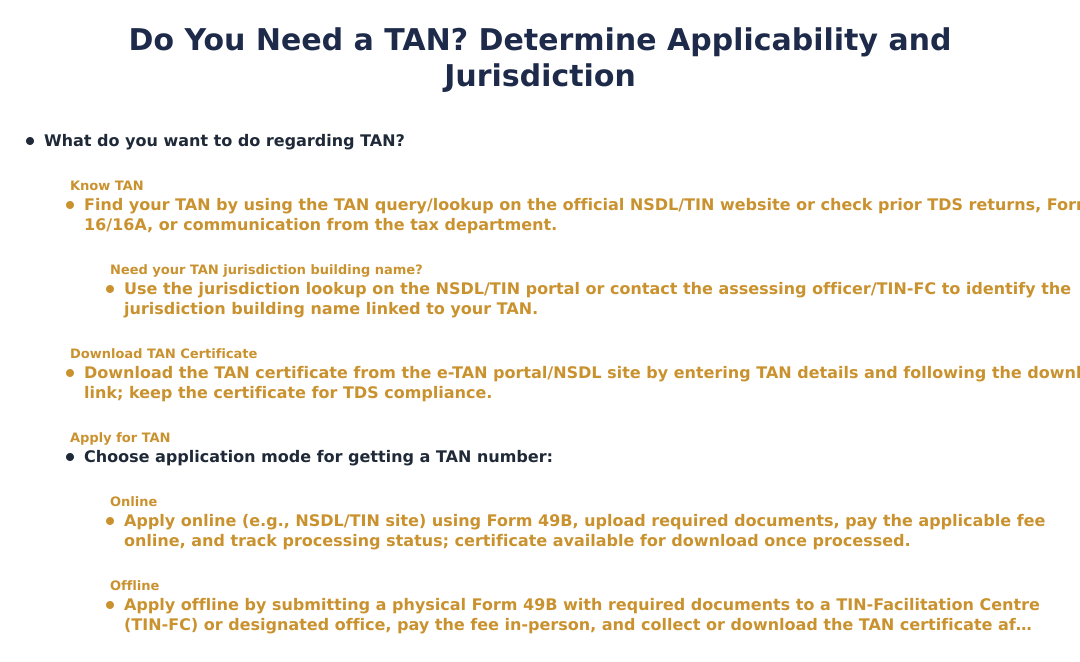
If you have previously applied for and received a TAN but cannot locate the number, there are established ways to retrieve or confirm your TAN details. Since TAN is the key identifier for anyone who deducts or collects tax at source, keeping a record of it alongside your accounting and statutory documents is a best practice.
Because TAN must be quoted on TDS/TCS returns, challans, payments and certificates, you can often find the TAN on past filings or payment documents. If those documents are not readily available, you can use either the online or offline channels provided by the tax administration to find the TAN, depending on which option is accessible to you.
How To Download TAN Certificate?
Look through previously issued TDS/TCS certificates, challans, and returns where the TAN is required to be quoted; the certificate or form may already contain the TAN.
If the TAN is not on hand, obtain the TAN certificate through the available official channels, keeping in mind that businesses can apply for and manage TAN both online and offline.
Once you have the TAN certificate, retain an accessible copy because TAN must be quoted on future returns, payments, challans and certificates.
How To Apply For TAN Number?
Decide whether to apply online or offline; both modes are available for TAN applications.
Prepare the business or deductor details that are asked for during the application process so the department can issue the 10-digit alphanumeric TAN.
Submit the application through the chosen mode and follow any verification or acknowledgement steps provided by the department until the TAN is issued.
How To Know Your TAN Jurisdiction Building Name?
TAN jurisdiction refers to the administrative unit within the tax department that handles matters related to your TAN. Knowing which jurisdiction is responsible for your TAN can help when you need support or have queries about TAN issuance and related compliance.
If you need details such as the office or building name handling your TAN, you can determine this through the department’s jurisdictional mapping or by using the online and offline support channels available for TAN services. Keep your TAN and related company or deductor details handy when making such enquiries to ensure accurate matching.
TAN is a mandatory 10-digit alphanumeric identifier for anyone who deducts or collects tax at source and must be quoted on TDS/TCS returns, challans, payments and certificates. Businesses have the flexibility to apply for and manage TAN through either online or offline routes. Maintain your TAN certificate and records carefully, and use the appropriate application or retrieval channel when you need to obtain or confirm TAN details.
Frequently asked questions
What is a TAN number and what does it look like?
TAN (Tax Deduction and Collection Account Number) is a 10-character alphanumeric identifier issued by the Income Tax Department for persons or entities that deduct or collect tax at source. It must be quoted on all TDS/TCS returns, payment challans and certificates to enable tracking of tax deducted/collected and proper credit to payees. The TAN structure is standardized (for example, five letters, four numbers and one letter) and is unique to each deductor/collector. Without a valid TAN you cannot file TDS returns or issue TDS/TCS certificates legally.
Who needs to apply for a TAN and when is it mandatory?
Any person or entity who is required to deduct tax at source (TDS) or collect tax at source (TCS) under the Income Tax Act must obtain a TAN before performing those transactions. This includes employers, businesses making contract payments, banks, and agents who collect tax on specified receipts; failure to obtain TAN attracts penalties and complications in filing returns. A TAN is required before filing the first TDS/TCS return or issuing TDS/TCS certificates, and the same TAN must be used for all related filings and challans. If circumstances change (e.g., change in deductor category or address) you may apply for changes to the TAN details through the prescribed process.
How do I apply for a TAN online step-by-step?
You can apply for a TAN online by submitting Form 49B through the NSDL (Protean) e-government website using the 'TAN - Apply' option and paying the prescribed processing fee online. The online process requires you to fill the applicant’s details, deductor category, and communication address, upload any required supporting document (if asked), and note the acknowledgement number generated on successful submission. After payment and submission you will receive an acknowledgement/receipt which you can use to track TAN allotment and later download the TAN allotment letter once processed. Keep the acknowledgement number, as the TAN certificate is downloadable from the same portal using that number when the application is approved.
How can I apply for TAN offline if I prefer paper forms?
To apply for TAN offline you must download and fill Form 49B, submit the completed form to any designated NSDL/Protean center or TIN facilitation center along with the required documents and the application fee (paid by demand draft or at the center). The centre/staff will process the form, provide you with an acknowledgement number and forward the application to the TAN processing unit; once allotted you can collect or download the TAN allotment letter. Offline applications are useful for applicants who cannot apply online but may take longer to process than online submissions. Retain the acknowledgement and payment proof to check the application status later.
What documents do I need to apply for TAN?
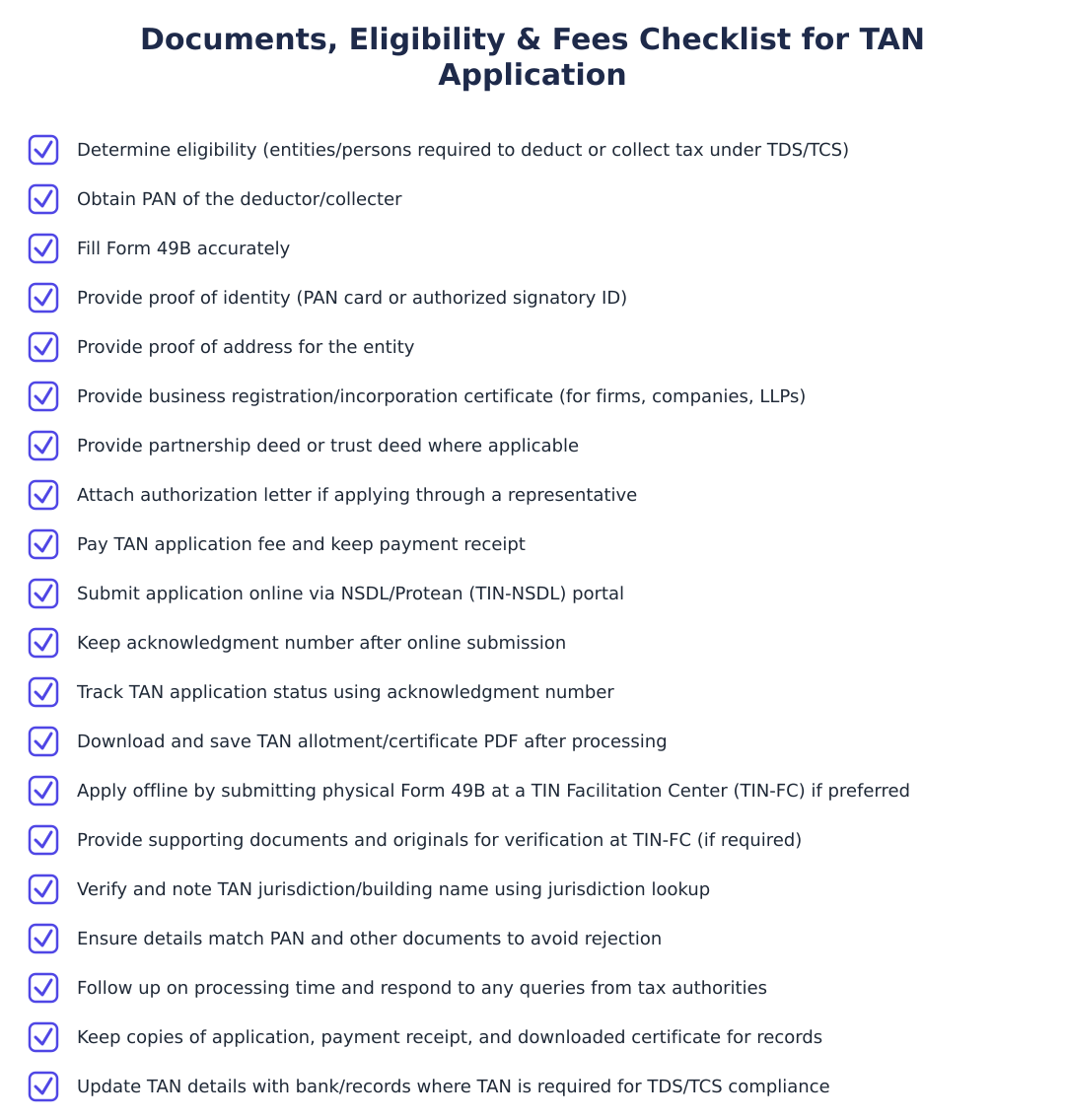
Typically you need proof of identity and proof of address of the deductor along with the completed Form 49B when applying for TAN, with the exact documents and any supporting proof specified on the NSDL/Protean application portal. For companies or firms, the authorised signatory’s identity proof and the entity’s registration documents (like Certificate of Incorporation or Partnership Deed) are usually required; for individuals, a copy of PAN and address proof may be requested. Originals are generally not submitted but should be available for verification if asked; attachments and document requirements differ for online and offline modes so check the portal instructions before submission. Always keep scanned copies (for online) or photocopies (for offline) of the documents and the application acknowledgement for your records.
How much does a TAN application cost and how long does it take to get TAN?
The TAN application attracts a processing fee that must be paid at the time of submission on the NSDL/Protean portal or at the facilitation centre; the exact fee amount and payment modes are shown during the online or offline application process on the portal. Processing time is generally short, once the application and fee are correctly submitted, TAN allotment is typically completed within a few working days, after which you can download the TAN allotment letter using the acknowledgement number. Delays can occur if documents are incomplete or payment fails, so use the acknowledgement number to track status and re-submit any missing information promptly. If you applied offline, allow extra time for physical transmission and processing by the facilitation centre.
How can I know or retrieve my TAN if I forget it?
You can retrieve your TAN using the Income Tax e-Filing 'Know Your TAN' facility by searching either by TAN or by deductor name and category, providing your registered mobile number for OTP verification. Select 'TAN' or 'Name', enter the required details (deductor category, state and name or TAN), receive an OTP on the entered mobile, validate the OTP and the system will display your TAN details on-screen. This service helps both when you remember the name but not the TAN or when you want to verify TAN details for the deductor; keep your mobile updated to receive the OTP successfully. You can also use the NSDL/Protean portal to search and confirm TAN details if instructed there.
How do I download the TAN allotment certificate after my TAN is allotted?
After TAN is allotted you can download the TAN allotment letter (TAN certificate) from the NSDL/Protean portal by selecting 'TAN-New/Change Request', entering the acknowledgement number from your application and submitting the captcha to view status and download the letter. The allotment page will show the TAN status and provide a link or button labelled like 'Click here to download your TAN Allotment Letter' which you can use to get a PDF of the certificate for record-keeping and for quoting on TDS/TCS documents. If you applied offline, use the acknowledgement number provided at submission to access the same facility once processing is complete. Keep a digital and printed copy of the TAN allotment letter as it is required when filing returns and issuing TDS certificates.
How do I find the TAN jurisdiction building name for my TAN?
To find the TAN jurisdiction building name you can log in to the official Income Tax website, go to the 'Important Links' section and click 'Jurisdiction', then select your state to open the PDF list that maps TAN jurisdiction offices and building names. The PDF lists TAN jurisdictions by state and helps you identify the specific tax office or building responsible for your TAN-related matters, which is useful for correspondence or in-person visits. If you cannot locate your TAN in the PDF, use the 'Know Your TAN' facility or contact the Income Tax e-Filing helpdesk for guidance on the correct jurisdiction. Keep your TAN and address details handy when checking the jurisdiction list to match entries accurately.
Run a service business? See every client's money on one screen.
MoneyGence shows who has paid, who is overdue and by how many days, with GST-ready invoices, bank reconciliation and renewal alerts alongside your TDS work. Free for up to 2 clients, no credit card needed.
Start free with 2 clients See how it works →