MSME Champions Portal, Guide to Features & Registration
This guide explains the MSME CHAMPIONS platform and what small and medium enterprises, entrepreneurs, associations and other stakeholders can expect from it. You will learn how to register grievances, submit suggestions, track the status of requests, access official support channels, and use resources intended to strengthen MSMEs. Understanding these features helps business owners and representatives use the platform effectively, whether the aim is resolving operational problems, seeking guidance, sharing improvement ideas, or locating support services. The guide also highlights practical steps for engaging with the platform and describes how feedback and control-room services integrate with other support tools. By the end, you should be able to navigate the main functions confidently and decide which actions to take next for your unit or organisation.
What the MSME CHAMPIONS platform does
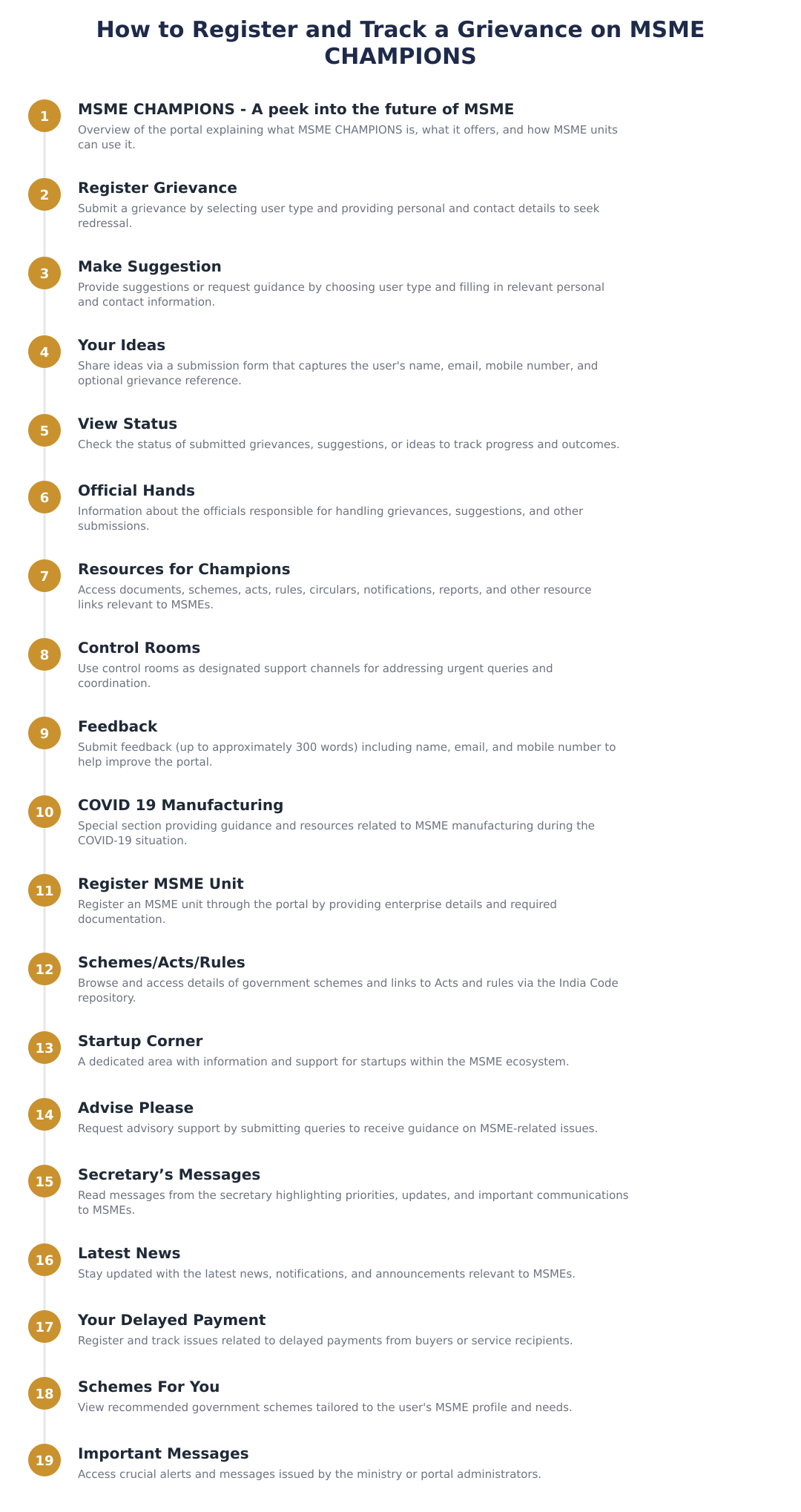
MSME CHAMPIONS is designed as a single interface where stakeholders can interact with support systems relevant to micro, small and medium enterprises. Core functions include lodging complaints or grievances, making suggestions, sharing ideas, and tracking the progress of matters raised through the portal. The platform is positioned to connect users with official channels and resources, helping convert field-level problems into actionable items.
For users, the platform aims to reduce friction when seeking help: it standardises the information required for submissions, categorises requests so they reach the appropriate officials, and provides visibility on follow-up steps. For administrators and officials, the system aggregates issues and ideas which can be used to prioritise interventions and coordinate responses across departments.
Using the platform effectively means providing clear, concise information when submitting requests and following the recommended steps for tracking and escalation. Regularly reviewing available resource sections and control-room updates can also help users stay informed about services and programmes that may be relevant to their needs.
Register Grievance, step-by-step
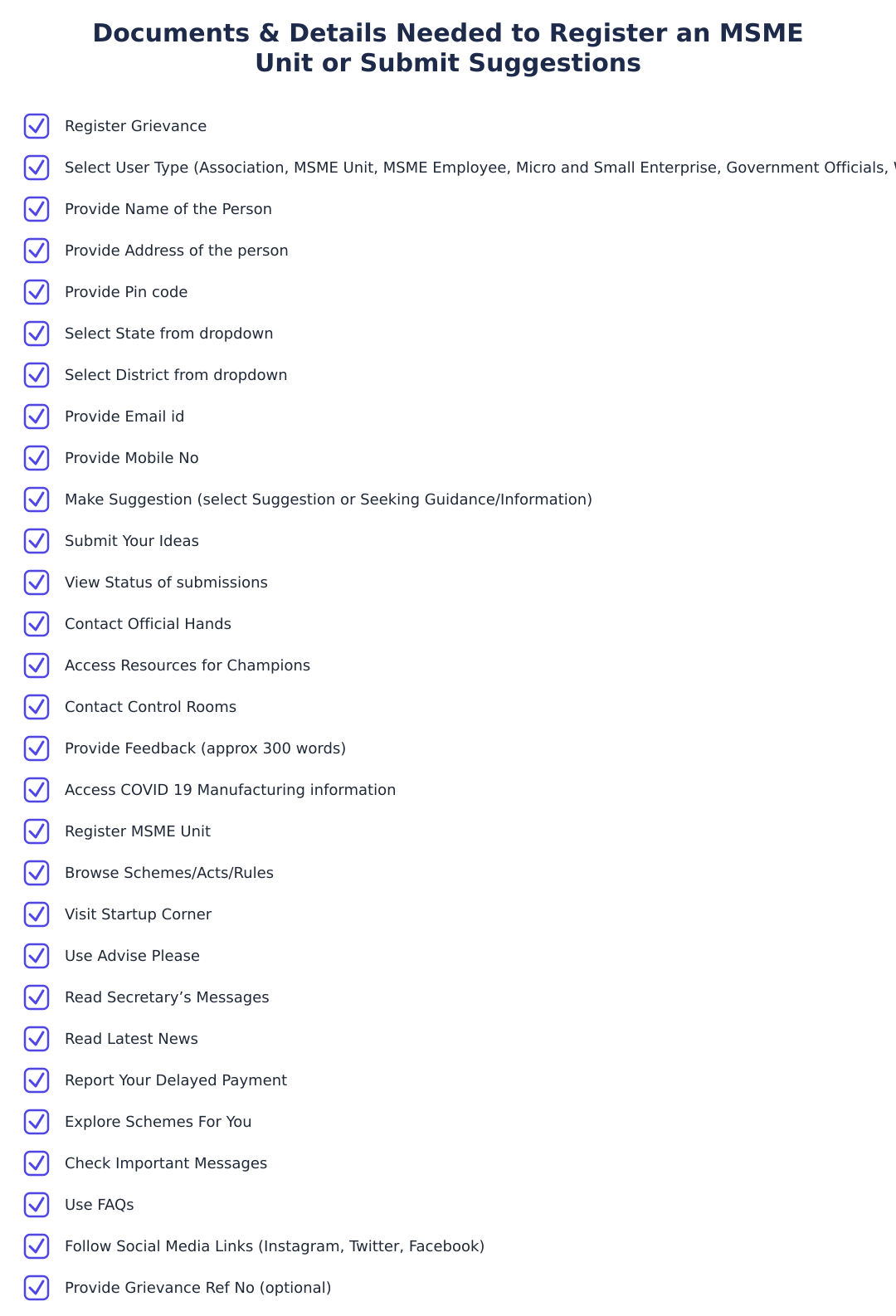
Pick the option that best describes you or your organisation so the submission is routed correctly.
Enter name, address, email and mobile number so authorities can reach you for follow-up.
Give a concise description of the issue and attach any supportive documents if the portal allows.
Submit the grievance and retain any acknowledgement or reference number for tracking.
Make Suggestions, Share Your Ideas
The platform accepts suggestions and ideas intended to improve programmes, processes, or services for MSMEs. When submitting a suggestion, users should clearly state the problem they are addressing, outline the proposed change or solution, and indicate any expected benefits or impact.
Idea submissions are often routed to appropriate teams for review. Well-structured suggestions that include context, potential implementation steps and contact details tend to be more actionable. Contributors may also use designated sections to track the status of their ideas and respond to any clarifying questions from officials.
View Status and Official Hands
A view status function allows users to monitor the progress of grievances, suggestions and other submissions. Tracking status reduces uncertainty and helps users know whether further documentation or clarification is needed. Status updates may also include notes from officials handling the case.
The official-hands section connects submissions to designated officials or departments responsible for resolution. Knowing the responsible office enables targeted follow-up and helps users escalate matters through proper channels when necessary. Regularly checking status entries and official responses is advisable to keep cases moving.
Resources, Control Rooms and Feedback
Resources for Champions typically bundle guidance documents, links to schemes and rules, FAQs, and other aids that help enterprises understand options available to them. Users should consult resource sections before submitting queries, as many common questions may already be answered there.
Control rooms and helplines provide real-time assistance and are useful for urgent matters or where immediate clarification is needed. The feedback mechanism enables users to report on their experience with the platform or service delivery and suggest further improvements. Supplying constructive feedback, including specific examples and contact information, helps administrators refine services over time.
MSME CHAMPIONS is intended to be a practical tool for addressing the needs of micro, small and medium enterprises through grievance redressal, idea sharing, and access to resources and official support. Use the portal’s submission and tracking features carefully, consult resource materials before raising common queries, and provide clear feedback to help the system evolve. Regular engagement with the platform can help businesses resolve problems faster and contribute ideas that shape better support for the MSME ecosystem.
Frequently asked questions
What is the MSME CHAMPIONS portal and who is it for?
MSME CHAMPIONS is a government portal and support platform designed to help micro, small and medium enterprises (MSMEs), associations, entrepreneurs and related stakeholders access grievance redressal, guidance, schemes and resources. It serves user types such as Associations, MSME Units, MSME Employees, Micro and Small Enterprises, Government Officials, Would-be Entrepreneurs, Individuals and Others. The portal provides modules like Register Grievance, Make Suggestion, Your Ideas, View Status and Official Hands plus dedicated sections for COVID-19 manufacturing support, startup corner and schemes/acts/rules. It also lists contact points such as Control Rooms and has sections for Latest News and Secretary’s Messages to keep users updated.
How do I register a grievance on the MSME CHAMPIONS portal?
You can register a grievance by selecting your user type from the dropdown (Association, MSME Unit, MSME Employee, Micro and Small Enterprise, Government Official, Would‑be Entrepreneur, Individual, Other) and filling mandatory fields like name, address, pincode, state, district, email ID and mobile number. The Register Grievance section captures details of the complaint and allows you to submit supporting information and track the grievance via a reference number. After submission you can use the View Status facility to monitor resolution progress and the portal links to Official Hands and Control Rooms for escalation if needed.
How can I suggest improvements or request information on MSME CHAMPIONS?
Use the Make Suggestion module where you first choose between 'Suggestion' or 'Seeking Guidance/Information', select your user type, and provide contact details including name, address, pincode, state, district, email and mobile number. The form allows you to describe your suggestion or information need and submit it to the ministry for consideration, and you can expect follow-up through the contact details provided. Suggestions are routed through the portal workflow and can be tracked using the View Status feature.
What is the 'Your Ideas' section and how do I use it?
The 'Your Ideas' section is a place to submit innovative proposals or improvements for MSME support where you provide your name, email, mobile number and optionally a grievance reference number along with a feedback description (around 300 words). This allows entrepreneurs and stakeholders to share actionable ideas that the ministry can evaluate and potentially adopt or pilot. Ideas submitted here are recorded on the portal and can be followed up via the provided contact details or tracked through the portal’s status features.
How do I track the progress of my grievance, suggestion or idea on MSME CHAMPIONS?
You track progress using the View Status feature by entering the reference number or necessary identifiers provided at submission to see current action and updates. The portal displays updates from officials and control rooms, and you can see escalations to 'Official Hands' when higher-level officers intervene. If resolution stalls you can escalate through the Control Rooms or use the portal’s contact information to seek faster action.
What is the 'Official Hands' section on the MSME CHAMPIONS portal?
'Official Hands' lists the officials and officers responsible for grievance redressal, scheme implementation and follow-ups so users know who is handling specific matters and how to reach them. This section helps ensure accountability by naming contact points and departments for escalations and faster resolution. It works together with Control Rooms and View Status so users can track which official has taken up their case and view related communications.
What resources and support does MSME CHAMPIONS provide for COVID-19 manufacturing and recovery?
The portal includes a dedicated COVID-19 Manufacturing section that provides guidance, resources and support measures to help MSMEs retool, obtain clearances and access schemes related to pandemic response and recovery. It links to relevant schemes, acts, rules and documents, and highlights control room contacts and advisories for urgent assistance. MSMEs can use these resources to identify government support, compliance requirements and opportunities to participate in public procurement for pandemic-related supplies.
How can I register my MSME unit through the portal and what details are required?
To register an MSME unit you fill the Register MSME Unit form with basic enterprise details and owner contact information; typical fields include name, address, pincode, state, district, email ID and mobile number plus business category (micro, small, medium) and other enterprise specifics. Registration connects your unit to government schemes and benefits listed under Schemes/Acts/Rules and allows you to access Startup Corner, Advise Please and other targeted support. Proper classification and accurate contact details ensure you receive scheme alerts, newsletters and important messages relevant to your unit.
Where do I find information about schemes, acts and rules relevant to MSMEs on the portal?
The Schemes/Acts/Rules section links to a curated list of ongoing government schemes, the India Code digital repository for central and state acts, and documents like notifications, circulars, tenders and reports that affect MSMEs. It also directs users to Schemes For You, Important Messages and the Startup Corner for scheme-specific eligibility, application steps and benefits. This consolidated access helps MSMEs identify grants, credit support, procurement opportunities and regulatory requirements they can apply for.
What other features like Control Rooms, Feedback and 'Advise Please' can help me on MSME CHAMPIONS?
MSME CHAMPIONS provides Control Rooms for immediate assistance and escalations, a Feedback form to submit experience reports (name, email, mobile, grievance ref no and approx 300-word feedback) and an 'Advise Please' section where entrepreneurs can request guidance or mentorship. These features are intended to provide operational support, collect user feedback to improve services, and connect MSMEs with experts or government advice for business challenges. Together they enhance responsiveness and give multiple channels to resolve issues, obtain information and influence portal improvements.
Run a service business? See every client's money on one screen.
MoneyGence shows who has paid, who is overdue and by how many days, with GST-ready invoices, bank reconciliation and renewal alerts alongside your MSME work. Free for up to 2 clients, no credit card needed.
Start free with 2 clients See how it works →