MSME Registration in India: Procedure, Documents & Benefits
This guide explains the essentials of MSME (Micro, Small and Medium Enterprises) registration in India using the Udyam portal. You will learn who can register, what the registration produces (certificate and registration number), how to check registration status and how to print the Udyam Registration Certificate. For business owners, entrepreneurs and entities considering formal recognition as an MSME, understanding these points matters because registration is the gateway to accessing government-issued identity and the range of benefits that the government makes available to registered MSMEs. The guide focuses on practical navigation of the Udyam portal and the concrete outputs of the process, the Udyam Registration Certificate (an e-certificate) and the permanent Udyam/MSME registration number, so you can confidently complete post-registration tasks such as verification and certificate download.
What is MSME Registration?
MSME registration is the formal enrolment of a business with the Ministry of Micro, Small & Medium Enterprises through the Udyam portal. When a business completes this process, the Ministry issues an e-certificate called the Udyam Registration Certificate that serves as the official record of the enterprise’s registration.
Registration creates an identity that the Ministry recognises and links to the enterprise. This identity is a permanent number, referred to as the Udyam or MSME Registration number, which can be used for verification and for accessing government schemes and benefits that are designed for registered MSMEs.
MSME Registration Eligibility
A broad range of organisational forms are eligible to register as MSMEs on the Udyam portal. Eligible entities include individuals and startups, as well as corporate forms such as private and public limited companies. Traditional business structures such as sole proprietorships, partnership firms and limited liability partnerships (LLPs) are also eligible.
Beyond these, organisations like self-help groups (SHGs), co-operative societies and trusts can also seek MSME registration. While registration itself is not mandatory, formal registration is required to obtain the benefits the government provides to MSMEs.
How to Apply for MSME Registration Online?
MSME registration can be completed online through the government Udyam portal at udyamregistration.gov.in. The portal is the official channel for registering enterprises and for related verification and certificate services.
The portal workflow covers submission, issuance of the e-certificate (Udyam Registration Certificate) and assignment of a permanent Udyam/MSME registration number. Use the portal’s guided forms and follow any on-screen instructions to complete the registration process and obtain the certificate and registration number.
How to Check MSME Registration Status
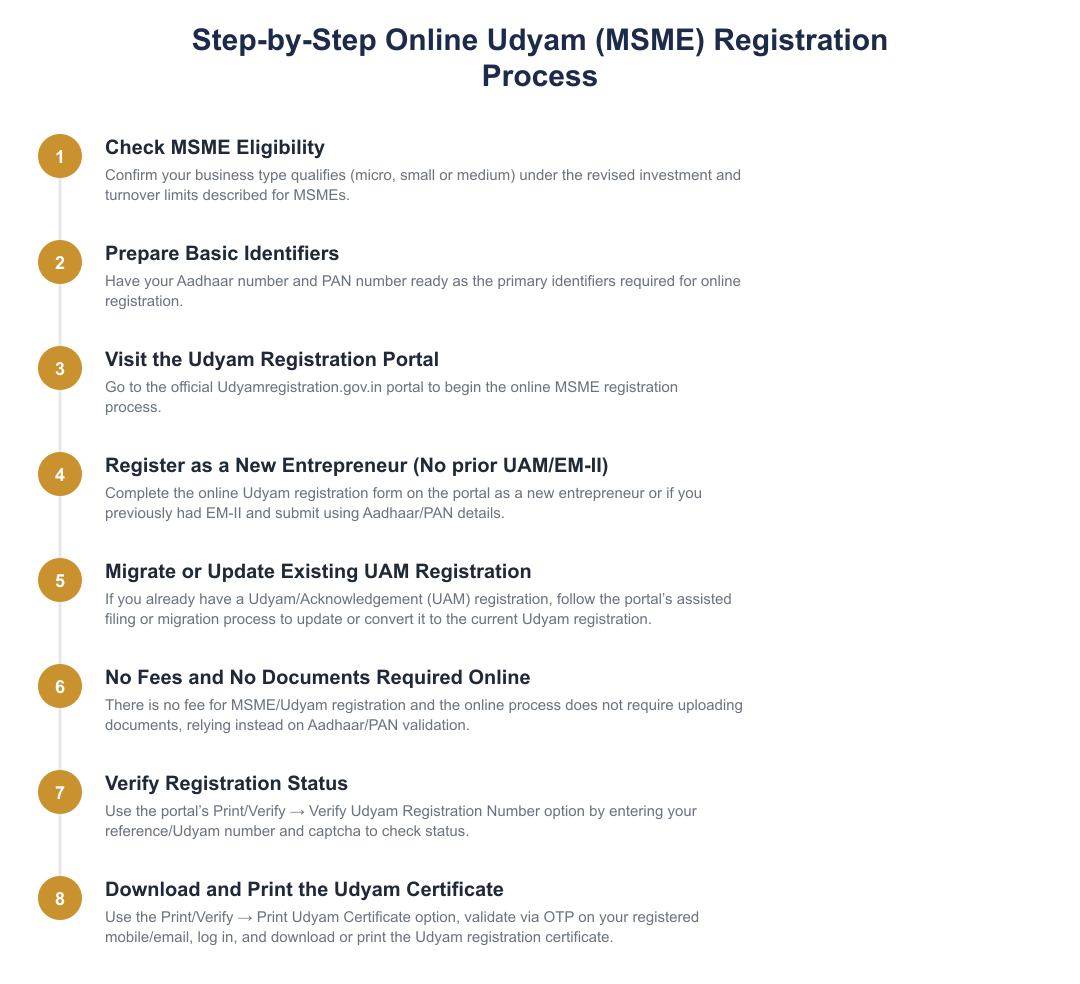
Go to udyamregistration.gov.in and choose the Print/Verify option.
Pick the Verify Udyam Registration Number option from the Print/Verify menu.
Provide your Reference Number and the captcha code, then click Verify to check the registration status.
How to Print the Udyam Registration Certificate
Visit udyamregistration.gov.in and click the Print/Verify option, then choose Print Udyam Certificate.
Input your Udyam Registration Number and mobile number, choose the OTP option and click Validate & Generate OTP.
Enter the OTP received on your mobile/email, validate to log in, and then print the Udyam Registration Certificate.
Udyam Registration Number and Certificate
Upon completion of registration, the Ministry of MSME assigns a permanent identity number known as the Udyam or MSME Registration number. This number is the primary reference for the enterprise’s registration record.
The Ministry issues an electronic Udyam Registration Certificate which can be printed from the Udyam portal using the registered details and OTP-based validation. Keep the certificate and the registration number handy for any future verification or application for government schemes.
MSME Registration Fees and Documents
Information on specific fees and the exact list of documents required for registration is maintained on the Udyam portal and related official guidance. The portal provides the authoritative instructions to follow during registration, including any document or identity requirements displayed during the online process.
If you are preparing to register, use the Udyam portal’s forms and help text as the primary source for current requirements. Because the registration is processed online, the portal will indicate which details or attachments (if any) are necessary at the time of application.
Use the Udyam portal as your single source of truth for registering as an MSME, checking status and printing the Udyam Registration Certificate. The portal issues an e-certificate and assigns a permanent Udyam/MSME registration number; these are the key outputs you will manage after registration. For the most accurate procedural prompts, always follow the live instructions on udyamregistration.gov.in.
Frequently asked questions
What is MSME registration and why should I get Udyam registration for my small business?
MSME registration, now called Udyam registration, is an online government registration for Micro, Small and Medium Enterprises that helps businesses access concessions, schemes and easier credit. It is not mandatory but registered MSMEs get benefits such as concessional bank loans, access to government tenders, waiver of security deposits, reimbursement for ISO fees, and eligibility for schemes like Credit Guarantee Trust Fund and Credit Linked Capital Subsidy. The Udyam certificate contains a permanent 19‑digit registration number and QR code that verifies the enterprise’s details. Many statutory and financial advantages (for example, MAT credit carry‑forward up to 15 years) are tied to having this registration.
Who is eligible to apply for MSME/Udyam registration in India?
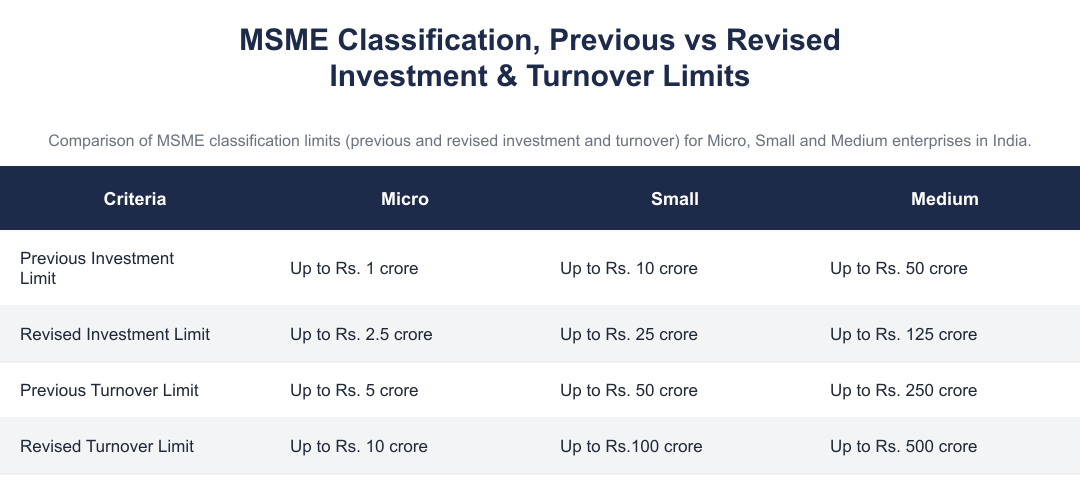
Any business entity operating in India can apply for Udyam registration, including proprietorships, partnerships, private or public limited companies, LLPs, trusts, co‑operative societies, SHGs, startups and individual entrepreneurs. Eligibility for Micro, Small or Medium classification depends on investment in plant and machinery/equipment and annual turnover, revised limits effective from 1 April 2025 are: Micro (investment up to Rs. 2.5 crore and turnover up to Rs. 10 crore), Small (investment up to Rs. 25 crore and turnover up to Rs. 100 crore), Medium (investment up to Rs. 125 crore and turnover up to Rs. 500 crore). Enterprises must self‑declare these financial parameters during registration on the Udyam portal.
What documents do I need to complete MSME (Udyam) registration online?
You only need your Aadhaar number and PAN to complete Udyam registration online for most proprietorships and individuals; other entities will provide PAN of the enterprise and Aadhaar details of promoters where applicable. The government states there is no requirement to upload documents for the standard online filing, information is verified electronically using Aadhaar and PAN. If an enterprise had an earlier UAM (Udyog Aadhaar Memorandum), additional details related to that registration may be required while migrating to Udyam.
How do I apply for MSME (Udyam) registration online step‑by‑step?
You apply for MSME registration online by visiting the Udyam registration portal (udyamregistration.gov.in) and selecting the appropriate path for new entrepreneurs or for those migrating from UAM/EM‑II. For new applicants you enter enterprise details, PAN, Aadhaar and self‑declare investment and turnover; for enterprises with an existing UAM the portal offers assisted filing or direct migration options. There is no registration fee and the process generates an e‑certificate (Udyam Registration Certificate) with a 19‑digit Udyam number once registration is complete.
What is the MSME/Udyam registration certificate and how do I download it?
The MSME/Udyam registration certificate is an e‑certificate issued by the Ministry of MSME containing the enterprise’s name, address, 19‑digit Udyam Registration Number and a QR code for verification. You can download it from the Udyam portal by choosing the ‘Print/Verify’ → ‘Print Udyam Certificate’ option, entering your Udyam Registration Number and mobile number, validating OTP and then saving or printing the certificate. The certificate serves as proof for availing government schemes, tender benefits and bank concessions.
How do I check the status or verify an MSME/Udyam registration number?
You can check or verify MSME/Udyam registration status on the Udyam registration portal using the ‘Print/Verify’ → ‘Verify Udyam Registration Number’ option by entering the Reference/Udyam Registration Number and captcha. The portal will display whether the registration is valid and show enterprise details linked to that Udyam number, which you can use to confirm authenticity. For printing, use the ‘Print Udyam Certificate’ flow and validate via OTP sent to the registered mobile/email.
Is there any fee or payment required for MSME/Udyam registration?
There is no fee for MSME (Udyam) registration, Udyam registration on the government portal is free of charge. The official process requires only Aadhaar and PAN validation and does not ask for any payment during registration, migration from UAM, or certificate download. Beware of third‑party websites or agents that charge a fee to file on your behalf; you can complete the registration yourself on the government portal at no cost.
What key benefits will my business get after MSME (Udyam) registration?
After Udyam registration, your business becomes eligible for several benefits including concessional bank loans, easier access to government tenders and e‑marketplace, waiver of security deposits, reimbursement for ISO certification, and eligibility for multiple government schemes like Credit Guarantee Trust Fund and Credit Linked Capital Subsidy. Registered MSMEs also get tax‑related advantages such as carrying forward Minimum Alternate Tax (MAT) credit for up to 15 years and reductions in certain regulatory or setup costs. These benefits help in cost savings, access to finance, technology upgradation and market promotion.
Need help staying MSME compliant?
MoneyGence's AI Finance OS tracks your compliance, wallet share, and finances in one place, built for agencies and growing businesses.
Get started with MoneyGence