Check MSME Registration by PAN: Verify Udyam Status Online
This guide explains how a buyer or third party can check whether an enterprise is registered as a micro, small or medium business using the entity’s permanent account number (PAN). Knowing a supplier’s MSME registration status helps businesses manage procurement risk, apply preferential payment terms where applicable, and ensure compliance with any internal policies that rely on supplier classification. In this article you will learn what documents and information to have ready before you begin, the typical online verification flow you will follow when checking a PAN, how to read and interpret common verification outcomes, and practical next steps if the PAN does not show an MSME registration. The steps described are intended to be platform-agnostic and focus on the user actions you will take (for example, entering PAN, validating identity where required, and checking the displayed registration status). No specific regulatory thresholds or statutory text are quoted here; the objective is to give a clear, usable procedure so you can quickly confirm registration status and take the appropriate commercial or compliance decision based on the result.
Prepare before you start
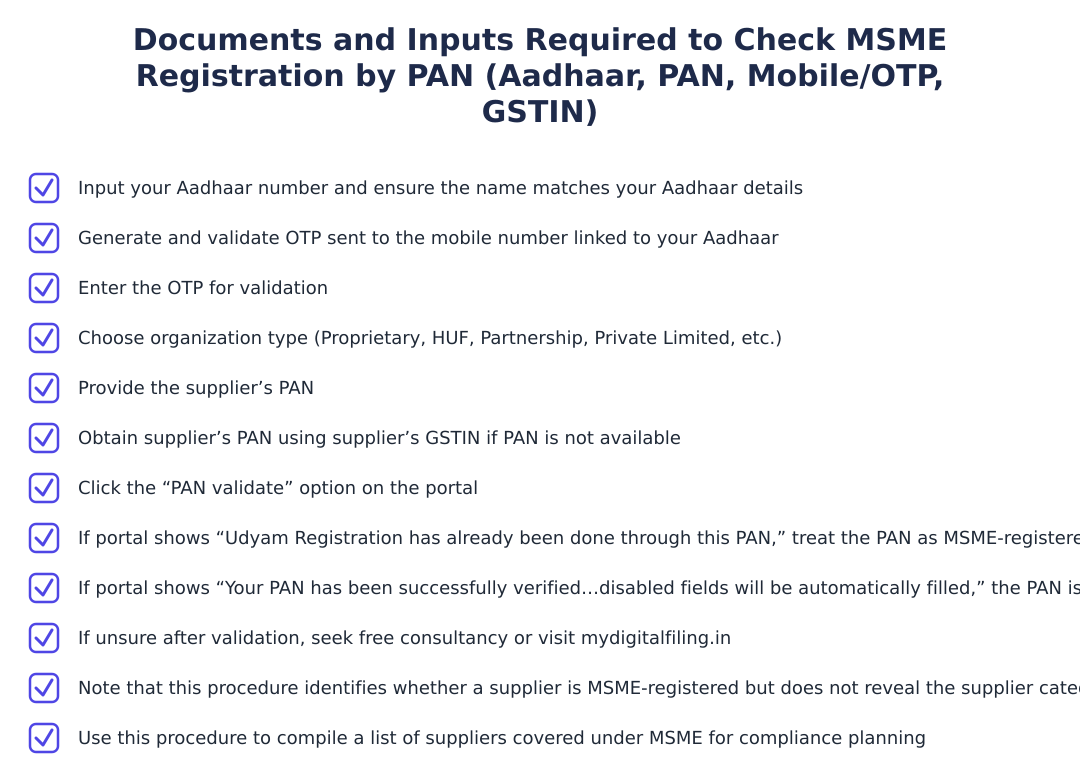
Before attempting a PAN-based MSME check, gather the basic details you will need: the PAN of the supplier or entity you want to verify and a reliable way to contact them if you need clarification later. If you are verifying on behalf of your organisation, make sure you have any internal authorisations required to query supplier details.
Also ensure you are using a secure internet connection and an official verification portal or service. Some portals may require identity validation steps (for example, OTPs to a linked mobile number) to prevent misuse of personal identifiers; expect to follow any such verification flow the portal requires.
Step-by-step: Checking MSME registration by PAN
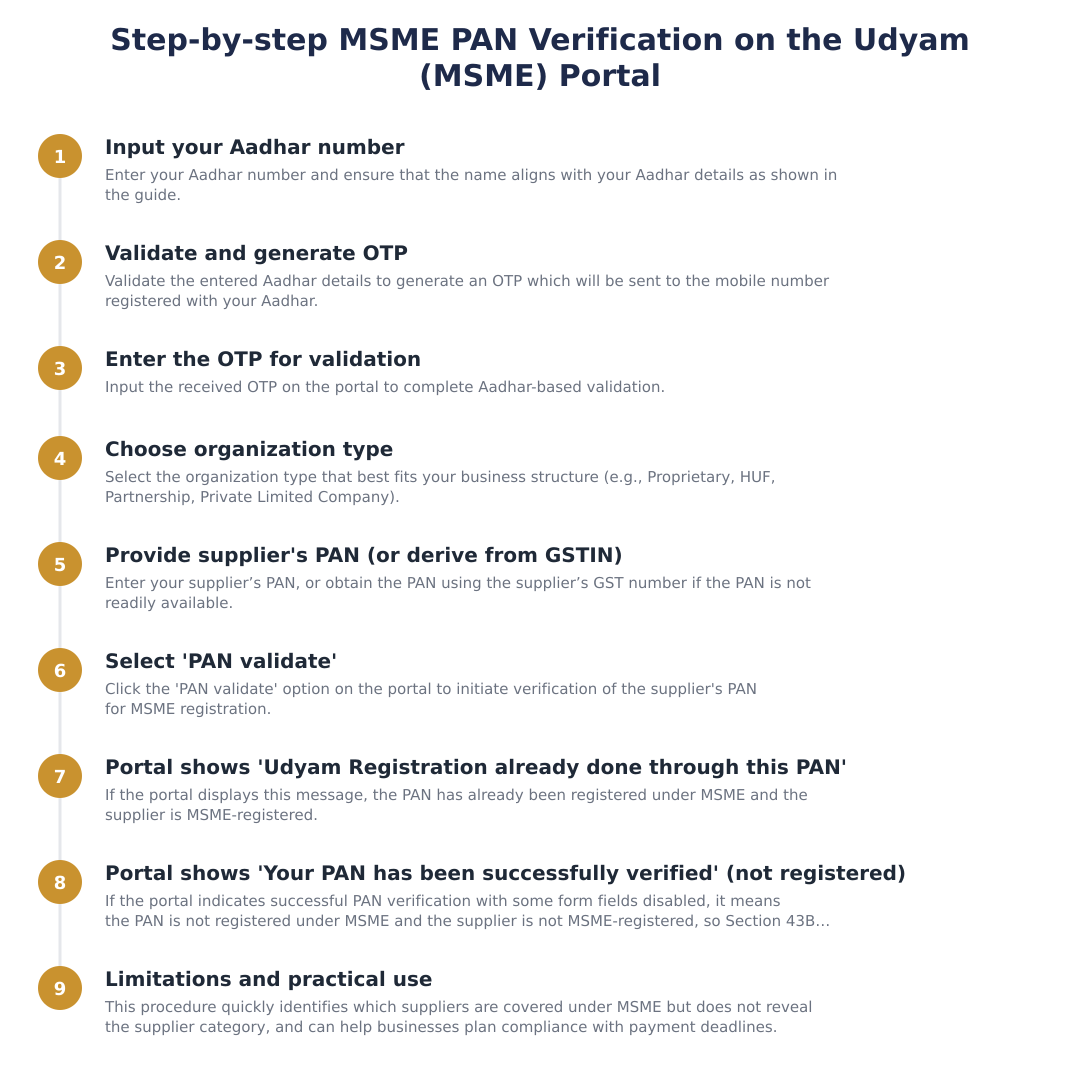
Open the official MSME registration or verification service provided by the relevant authority. Avoid third-party sites of unclear provenance.
Select the option that allows verification using PAN. Some portals offer multiple search fields (Aadhaar, GSTIN, PAN); pick PAN for this purpose.
Type the PAN carefully, following any formatting prompts. Some services may also ask for the name as on PAN for cross-checking.
If the portal requires validation (for example via OTP or other means), follow the prompts to complete verification before results are shown.
After validation, the portal will display whether the PAN is linked to an MSME registration or not. Note any reference number or certificate details shown.
How to interpret the result
A positive match typically means the PAN you entered is linked to an MSME registration record; the portal may display a registration number, date of registration, or other identifying details. Record or capture the displayed information if you need it for your supplier file or audit trail.
If the PAN does not match any MSME registration, this indicates there is no active registration record associated with that PAN in the portal’s database. Lack of a match does not necessarily mean the supplier has no claims, it may mean they have not completed registration or there is a data mismatch (for example, differing names or PAN entered incorrectly). In such cases, follow up with the supplier for documentary proof or request that they share their registration details.
Next steps after verification
If the PAN shows an MSME registration, keep a copy of the registration reference or certificate for your records and update your supplier master accordingly. Verify that the supplier’s invoicing and other claims align with the registration data shown.
If the PAN does not show registration, contact the supplier and ask for their registration evidence. If they claim to be registered but cannot produce proof, request they complete registration or provide an explanation. Where necessary, adopt your organisation’s standard supplier risk or escalation process for unresolved discrepancies.
Checking MSME registration by PAN is a quick way to confirm a supplier’s registration status when you need to apply supplier-specific policies or verify claims. Use an official portal, follow the verification steps carefully, save any registration references you receive, and always follow up with the supplier if the online result is negative or unclear. Keeping a clear trail of verification helps both commercial decision-making and compliance documentation.
Frequently asked questions
How can I check if a supplier is MSME-registered using their PAN number?
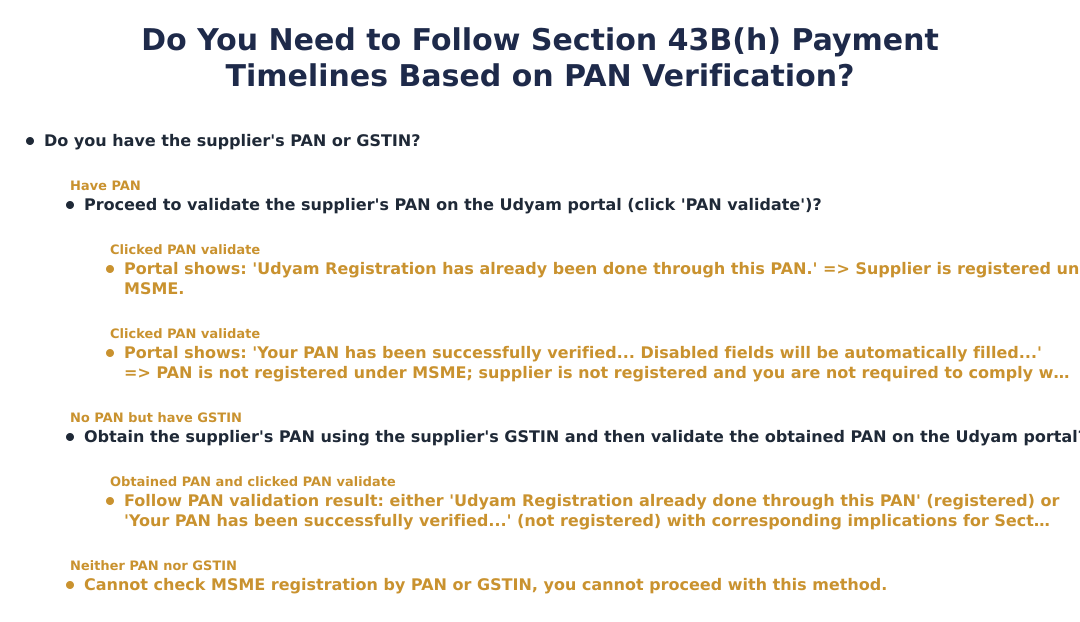
You can check a supplier's MSME registration by entering their PAN on the Udyam registration portal and clicking 'PAN validate'. The portal will either show “Udyam Registration has already been done through this PAN,” meaning the PAN is already registered under MSME, or it will confirm PAN verification and auto-fill some fields if the PAN is not registered. If the PAN is not registered under MSME, the supplier is not treated as an MSME for purposes such as Section 43B(h) payment timelines. If you only have the supplier's GSTIN, you can first obtain their PAN from GST records and then validate the PAN on Udyam.
What does the message “Udyam Registration has already been done through this PAN” mean?
That message means the PAN you validated is already used to create an Udyam (MSME) registration and the entity is registered as an MSME. You can rely on this confirmation to treat the supplier as an MSME for compliance and reporting purposes, including payment timeline considerations under relevant rules. The portal will not require further PAN verification in that case, but it will not necessarily show the MSME category (micro/small/medium) via this simple PAN check. If you need the Udyam number or category, you may need to ask the supplier or use the full Udyam search features on the portal.
What if the portal says 'Your PAN has been successfully verified', is the supplier an MSME?
If the portal says 'Your PAN has been successfully verified' and indicates some fields will be disabled, it means the PAN is valid but not currently registered under MSME/Udyam. In that situation the supplier is not registered as an MSME and you are not required to follow MSME-specific payment timelines under provisions like Section 43B(h). To be fully sure, you can request the supplier's Udyam number or perform additional checks, but the PAN verification result itself shows no existing MSME registration.
Can I check MSME registration using Aadhar instead of PAN on the Udyam portal?
Yes, the Udyam registration process lets you use Aadhaar to pre-fill and verify identity, but the standard check for existing registration by a supplier generally uses PAN validation on the portal. When using Aadhaar you must input the Aadhaar number, ensure the name matches Aadhaar details, and validate via OTP sent to the Aadhaar-linked mobile number; this helps create or continue registration. However, if your goal is simply to check whether a supplier is already registered as MSME, validating the supplier's PAN on Udyam is the direct method described for that purpose.
What if I started Udyam registration and the portal says my PAN was already used but I don't have an Udyam number?
If the portal shows 'Udyam Registration has already been done through this PAN' but you never completed registration or do not have the Udyam number, it means a record exists for that PAN on the portal (possibly from a partial or previous submission). You should use the 'forgot Udyam number' or recovery options on the Udyam portal or contact Udyam support for assistance to retrieve the registration details; keep Aadhaar, PAN and registered mobile/email handy for verification. If needed, you can also seek help from consultants or the portal's helpdesk to reconcile ownership and update contact information.
Will the PAN validation method show whether a supplier is micro, small or medium?
No, the simple PAN validation on the Udyam portal will only tell you whether the PAN is already registered as an MSME; it does not display the supplier's MSME category (micro, small or medium). If you need the category, you must obtain the supplier's Udyam number and then view the full registration details on the Udyam portal or ask the supplier to share the registration certificate. The PAN check is useful for quickly identifying which suppliers are covered under MSME for payment-timing rules but not for detailed classification information.
If I only have the supplier's GSTIN, can I still check their MSME registration status?
Yes, if you only have the supplier's GSTIN you can obtain their PAN from GST records (where PAN is often linked) and then use that PAN to validate on the Udyam portal. The instructions note that supplier PAN can be obtained using the supplier’s GST number when PAN is not readily available, and once you have the PAN you can perform the 'PAN validate' step on Udyam. Remember that GSTIN-based PAN extraction depends on public availability and correct GST registration details, and you should verify accuracy before relying on the MSME check for compliance.
Does checking PAN on Udyam affect my obligation under Section 43B(h) about payment timelines?
Yes, checking the supplier's PAN on the Udyam portal helps determine whether the supplier is an MSME, which affects obligations under Section 43B(h) regarding timely payments. If the PAN check shows the supplier is registered as an MSME, you must follow the applicable payment timelines (such as payment within the prescribed days) for those suppliers; if the PAN is not registered, you are not required to follow the MSME-specific payment deadline for that supplier. If there is any doubt after the verification, you should seek clarification or free consultancy resources (for example the referenced mydigitalfiling.in guidance) before taking a compliance position.
Is there any way to check MSME registration without OTP or supplier cooperation?
No, the Udyam portal's Aadhaar-based identity steps require OTP to validate Aadhaar-linked mobile numbers, and PAN validation requires accurate PAN input; there is no guaranteed anonymous, OTP-free search that will disclose full MSME registration details and protected contact information. For a quick check whether a PAN is already registered you can use the Udyam 'PAN validate' function which does not require the supplier's Aadhaar OTP but does require the PAN itself; to retrieve Aadhaar-linked details or to complete registration you will need OTP on the Aadhaar-linked mobile. If you cannot get the PAN or cooperation, ask the supplier to share their Udyam number or GST-invoice details as evidence of registration.
Run a service business? See every client's money on one screen.
MoneyGence shows who has paid, who is overdue and by how many days, with GST-ready invoices, bank reconciliation and renewal alerts alongside your MSME work. Free for up to 2 clients, no credit card needed.
Start free with 2 clients See how it works →