DIR-3 KYC – Guide for Directors | File e-Form KYC by Sept 30
This guide explains the purpose and practical approach to completing DIR-3 KYC, the director-level KYC compliance process required under company law. You will learn what information is typically reviewed, what kinds of supporting documents are usually needed, common checkpoints to verify before submission, and what typically happens after you file the form. The aim is to help directors and company compliance teams prepare efficiently so filings are accurate and reduce the risk of queries or follow-ups. The guide outlines preparation tips, the usual sequence of actions during the online filing experience, and the typical communications to expect after submission. Whether you are filing this director KYC for the first time or refreshing previously submitted details, the guidance here will help you avoid common pitfalls, ensure the right supporting documents are at hand, and understand the practical consequences of non-compliance. This is a practical, compliance-focused walkthrough rather than a legal brief, designed to save time during the filing process and to improve the quality of initial submissions so you face fewer rejections or amendments.
Who has to file e-Form DIR-3 KYC?
The requirement to complete director-level KYC is aimed at maintaining accurate and up-to-date records of company directors. Typically, the obligation applies to individuals who hold director identification in the corporate registry and to situations where director details are required to be confirmed or updated. The intent is to ensure the registry contains reliable contact and identity information.
In practice, organisations should check whether a director needs to file a fresh KYC or only a confirmation of previously recorded details. Where a director's particulars have changed or where a director is newly recorded in the registry, the director or the company usually needs to take action to bring the registry data up to date.
Checkpoints for filing the e-Form DIR-3 KYC
Before starting the online filing, it is useful to run through a checklist to avoid avoidable errors. Typical checkpoints include verifying that personal contact details (mobile and email) you will provide are active and accessible, ensuring identity numbers and addresses are consistent across documents, and confirming that any digital signature you plan to use is valid and available.
Another important checkpoint is who will certify the filing, when certification by a practising professional is required. Confirming these roles and having scanned copies of supporting documents ready reduces delays. Also ensure that the person filing understands the form fields and is prepared to enter information exactly as it appears on supporting identity documents.
Consequence of not filing e-Form DIR-3 KYC within the specified due date
Failure to complete director KYC within the prescribed timeline in the applicable rules can lead to administrative consequences. These may include restrictions on the director’s standing in the registry or notifications from the registry requiring remedial action. It is important to treat director KYC as an ongoing compliance obligation to avoid such outcomes.
If a director misses the filing window, the usual practical response is to prioritise completing the outstanding KYC at the earliest and to address any notices or communications issued by the registry. Keeping proof of attempted compliance and any correspondence can be helpful if retrospective clarification is needed.
Documents required for filing e-Form DIR-3 KYC
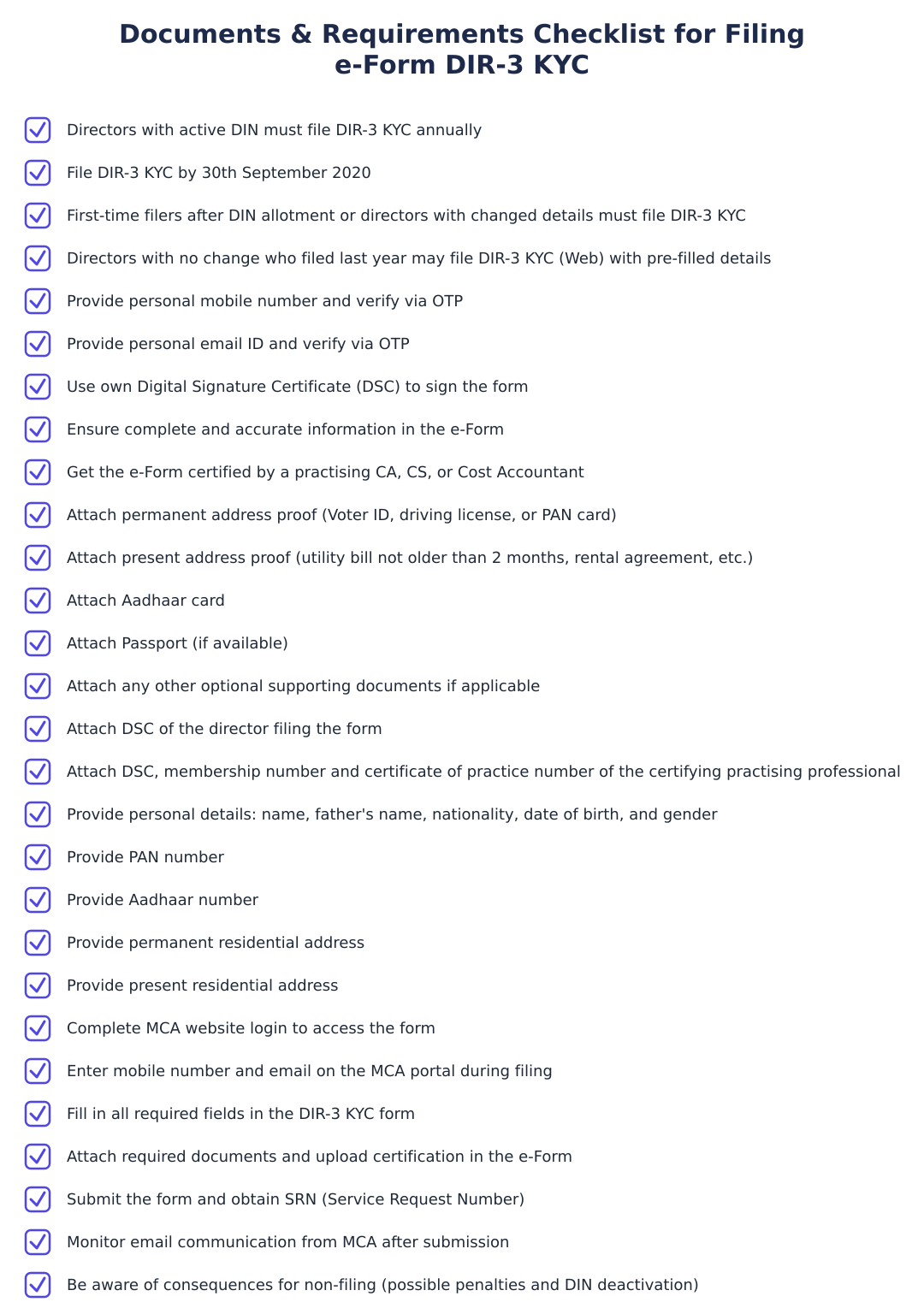
Commonly requested supporting documents include proof of identity, proof of permanent address, and proof of present address where applicable. Identity documents will often include nationally issued identity cards, and address proofs often include recent utility bills or similar documents. Directors should have originals or certified copies accessible for verification if required.
Additionally, digital identity credentials and any professional certifications required for form certification should be available in advance. Preparing clear, legible scans of each required document and ensuring the document dates meet any recency requirements will reduce the likelihood of rejection on technical grounds.
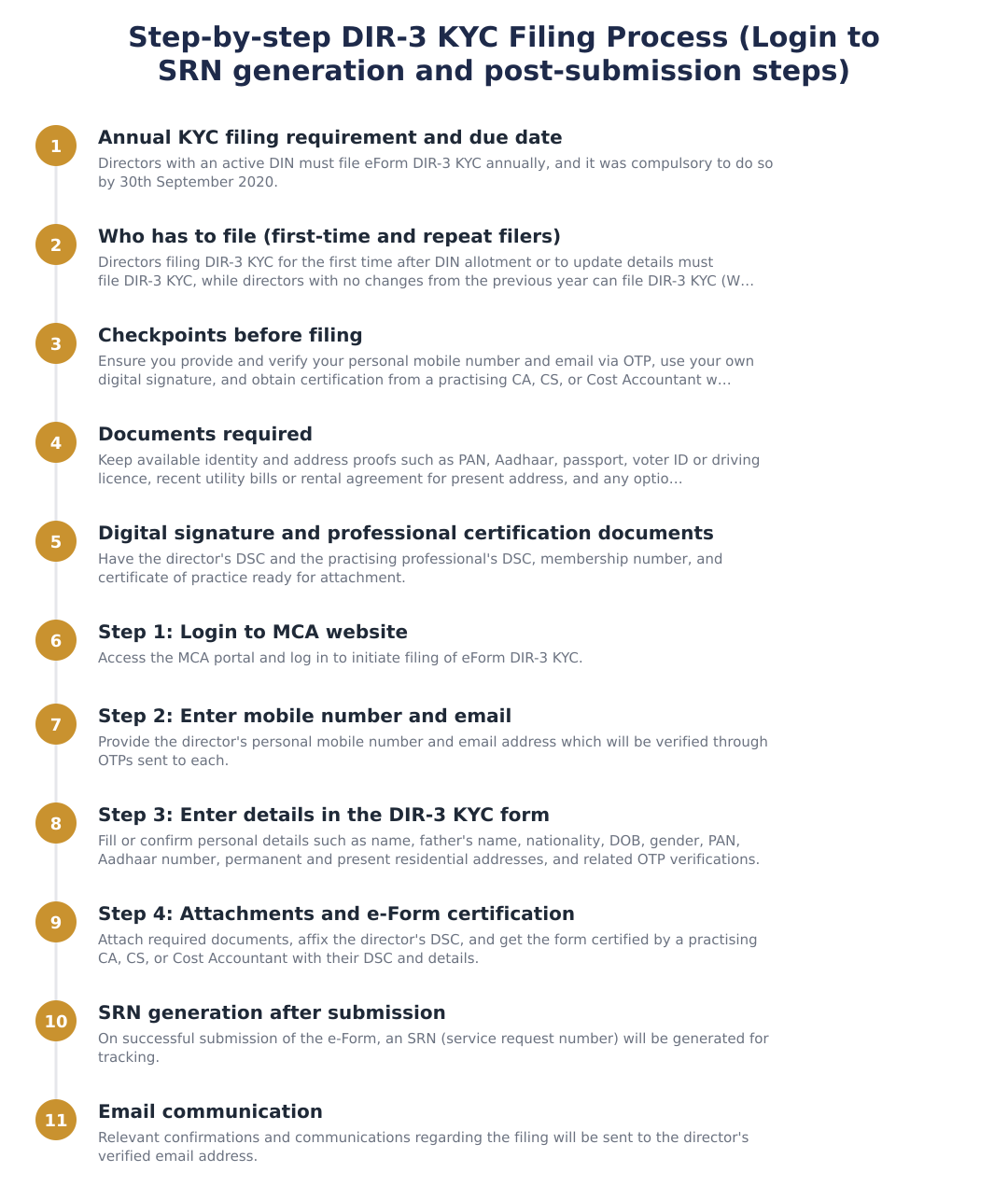
Step-by-step guide to file e-Form DIR-3 KYC
The online filing typically follows a predictable sequence: logging in to the registry portal, entering personal and contact details, attaching supporting documents, and completing any verification steps such as OTP verification of mobile and email. It is helpful to work through the form in one sitting with all required documents at hand.
Certification and submission are the final steps in the process. Where a practising professional’s certification is required, confirm their details and digital signing requirements beforehand. After submission, keep the acknowledgment or reference number for follow-up and recordkeeping.
Process after form submission
After the form is submitted, the electronic system commonly generates an acknowledgement or reference number which should be retained for tracking. The registry may also carry out internal validation of the submitted information and documents and will communicate any deficiencies or approval via the registered contact channels.
Email communication is a frequent channel for status updates. Keep an eye on the registered email and mobile for confirmations, requests for additional information, or final acceptance. If follow-up is required, responding promptly with clear supporting evidence typically resolves outstanding issues faster.
Completing director KYC is a routine but important compliance task that helps maintain the integrity of the corporate registry. Advance preparation, correct documentation, and prompt response to any communications will make the process smoother. Treat the filing as part of regular corporate housekeeping and keep records of submissions and acknowledgements for future reference.
Frequently asked questions
Who has to file e-Form DIR-3 KYC?
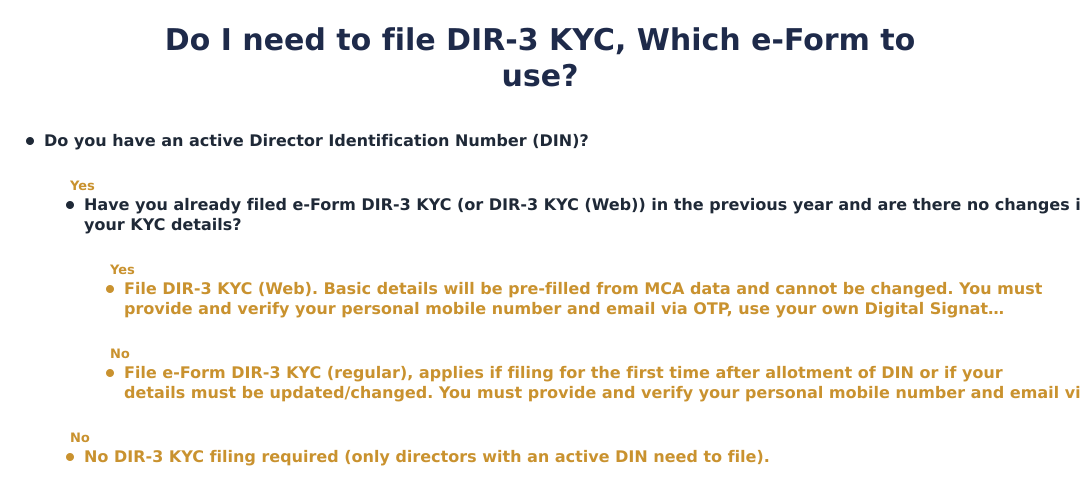
Every director who has an active Director Identification Number (DIN) allotted on or before the end of the financial year must file e-Form DIR-3 KYC annually; this was made compulsory with a due date of 30th September 2020 for earlier filings and thereafter each year by 30th September. This includes directors filing KYC for the first time after DIN allotment and directors who need to update their KYC details; directors who have already filed in the previous year and have no change may use DIR-3 KYC (Web) instead. The requirement also applies to disqualified directors and is tied to the DIN remaining in approved/active status. Failure to file by the due date may lead to consequences for the DIN (see related question).
What documents do I need to file DIR-3 KYC?
You must attach proof of permanent address (such as Voter ID, driving licence or PAN), present address proof (utility bill not older than 2 months or rental agreement), Aadhaar card and/or passport, plus any optional supporting documents if applicable. In addition, the director filing must have their own Digital Signature Certificate (DSC), and where the e-Form is certified, the practising professional (CA/CS/Cost Accountant) must attach their DSC, membership number and certificate of practice details. Ensure the address proofs and identity documents are current and legible because mobile and email verification via OTP are mandatory during filing.
How do I file DIR-3 KYC step by step on the MCA portal?
File DIR-3 KYC by logging into the MCA portal, entering your mobile number and email for OTP verification, filling in the pre‑filled and editable KYC fields as applicable, attaching required proofs and DSC, and then certifying and submitting the e-Form. Step 1 is to log in to MCA; Step 2 requires entering and verifying the mobile number and email via OTPs; Step 3 is to complete the form fields (name, DOB, PAN, addresses, Aadhaar, etc.); Step 4 is to attach supporting documents and affix the director’s DSC and the certifying professional’s DSC before e‑filing. After submission you will receive an SRN and email communication confirming receipt and subsequent processing status.
Do I need my own digital signature certificate (DSC) to file DIR-3 KYC?
Yes, the director filing the e-Form must use his or her own Digital Signature Certificate (DSC) to sign the application. Additionally, if the form is certified by a practising professional (CA/CS/Cost Accountant), that professional must also sign using their DSC and provide their membership and certificate of practice number. The MCA will not accept the form without the required DSCs where applicable, so obtain and install the DSC beforehand to avoid filing delays.
How are my mobile number and email verified while filing DIR-3 KYC?
Your mobile number and email must be provided in the e-Form and are verified by OTPs (one-time passwords) sent to each for confirmation during filing. The OTPs must be entered correctly in the form at the time of filing to validate contact details; without successful OTP verification the submission will not be accepted. Use a mobile number and email that you personally control because these contacts become linked to your DIN records and are used for MCA communications.
What does the certifying professional need to do for DIR-3 KYC?
A practising Chartered Accountant (CA), Company Secretary (CS) or Cost Accountant must certify the e-Form where required, signing with their DSC and providing their membership number and certificate of practice number. The certifying professional must verify that the information in the form is complete and correct before affixing their digital signature; incorrect certification can lead to form rejection or compliance issues. Ensure you provide the professional’s correct details and DSC at the time of filing so the MCA can accept the certification.
What happens after I submit DIR-3 KYC, SRN and email communication?
After successful submission of the e-Form, the MCA system generates a Service Request Number (SRN) and sends an email to the director’s registered email confirming receipt and providing the SRN for tracking. The SRN is used to monitor processing status or to respond to any queries from the MCA; keep this SRN safe until processing is complete. The MCA will also communicate further actions or confirmations (such as activation status or deficiency notices) via the registered email and through updates on the MCA portal tied to the SRN.
What are the consequences of not filing DIR-3 KYC by the due date?
If a director fails to file DIR-3 KYC by the due date the MCA may mark the Director Identification Number (DIN) as 'Deactivated', which prevents the director from being appointed or continuing as a director in companies until KYC is filed and DIN is reactivated. Deactivation affects the director's ability to hold directorships and may trigger additional compliance steps to reactivate the DIN; repeated non‑filing can lead to further regulatory action as per MCA rules. To avoid deactivation, file the e-Form within the stipulated annual timeline and keep contact and KYC details updated.
What is the difference between DIR-3 KYC and DIR-3 KYC (Web)?
DIR-3 KYC is the standard e‑Form used when a director is filing KYC for the first time after DIN allotment or when updating/change of details is required, whereas DIR-3 KYC (Web) is for directors who filed the previous year and have no change in KYC details, the web form is pre‑filled and non-editable. Use DIR-3 KYC (Web) only when your MCA‑recorded details remain unchanged; if you need to update mobile, email, address or other particulars you must file DIR-3 KYC (non‑web) with supporting documents and certification. Both require OTP verification of contact details and the director’s DSC for submission as applicable.
Run a service business? See every client's money on one screen.
MoneyGence shows who has paid, who is overdue and by how many days, with GST-ready invoices, bank reconciliation and renewal alerts alongside your Compliance work. Free for up to 2 clients, no credit card needed.
Start free with 2 clients See how it works →