
On this page 11 sections
Someone sends you a quote for Rs 59,000 "including GST" and you need the base price. Or you are raising an invoice and want to add 18% without a calculator. Both questions come up weekly in any service business, and both have a simple answer.
The part that trips people up is removing GST from a total. Most people subtract 18% of the total, and the answer is wrong. This guide gives you both formulas, worked examples in rupees, the CGST, SGST and IGST split, and Excel formulas you can paste straight in.
GST rates in India now
On 3 September 2025, the 56th GST Council meeting approved a simpler rate structure, effective 22 September 2025. The old 12% and 28% slabs were largely removed. You can read the Council's own release on the GST Council press release (PDF).
Rebuild with the Table button, 3 columns:
| GST rate | What it covers | Note |
|---|---|---|
| 0% | Exempt and nil-rated items | Essentials such as some medicines |
| 5% | Merit rate | Many daily essentials and some services |
| 18% | Standard rate | Most goods and most professional services |
| 40% | Demerit rate | Sin goods and select luxury items |
How to add GST to a price
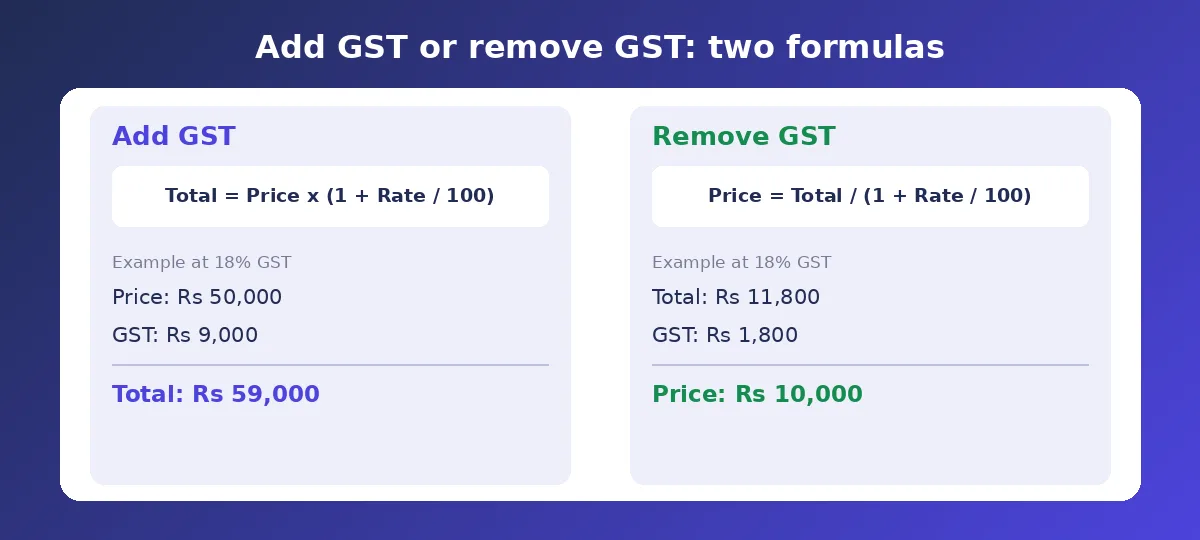
Example: your fee is Rs 50,000 and the GST rate is 18%.
- GST amount = 50,000 x 18 / 100 = Rs 9,000
- Total = 50,000 + 9,000 = Rs 59,000
How to remove GST from a total
[Info]
Example: the total on the invoice is Rs 11,800 including 18% GST.
- Price = 11,800 x 100 / 118 = Rs 10,000
- GST amount = 11,800 - 10,000 = Rs 1,800
Quick reference: multipliers
If you do this often, remember the multiplier. To add GST, multiply by it. To remove GST, divide by it.
Rebuild with the Table button, 3 columns:
| GST rate | To add GST | To remove GST |
|---|---|---|
| 5% | Price x 1.05 | Total / 1.05 |
| 18% | Price x 1.18 | Total / 1.18 |
| 40% | Price x 1.40 | Total / 1.40 |
Another shortcut: GST as a share of a GST-inclusive total is rate / (100 + rate). At 18% that is 18/118, about 15.25%, and at 5% it is 5/105, about 4.76%. So the GST inside a Rs 11,800 total is 11,800 x 18 / 118 = Rs 1,800.
CGST, SGST and IGST: how the tax is split
The total GST is the same, but the way it appears on the invoice depends on where you and your client are.
- Same state: GST splits equally into CGST (to the Centre) and SGST (to the state). At 18%, that is 9% and 9%.
- Different states: you charge IGST for the whole rate, 18% in this case.
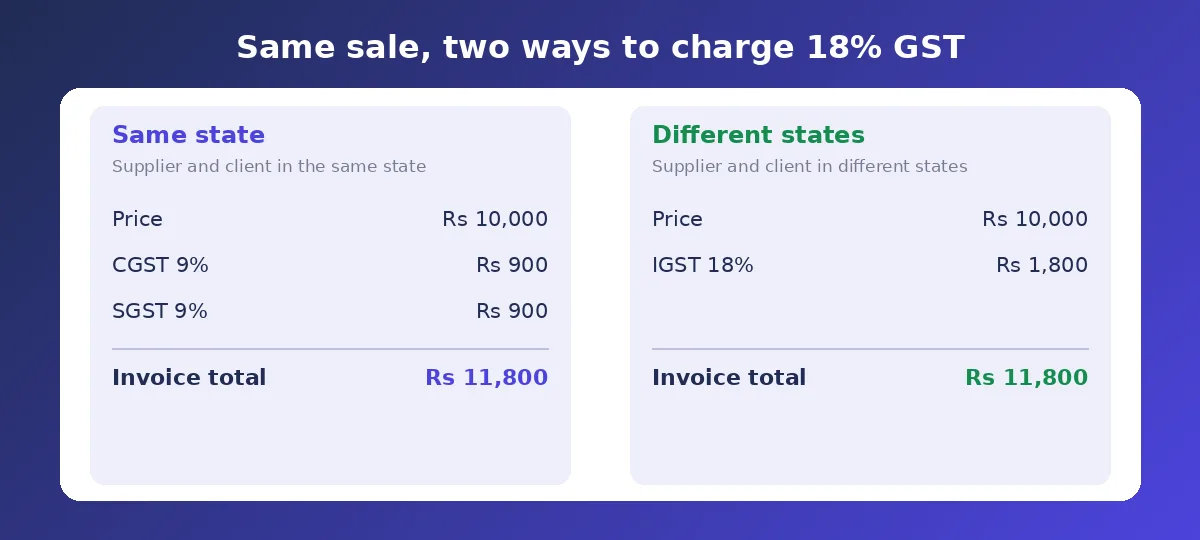
The place of supply decides which applies. For the fields every service invoice needs, see GST Registration for Service Providers, and for the service codes that go on it, see SAC Codes for Service Providers.
GST formulas for Excel
Put the price in B2 and the rate (for example 18) in B3.
Add GST amount: =B2B3/100 Total with GST: =B2(1+B3/100) Remove GST (price): =B2/(1+B3/100) GST inside a total: =B2-B2/(1+B3/100) CGST or SGST half: =B2*B3/100/2
GST on discounts and mixed invoices
- Discounts: GST is charged on the price after a discount shown on the invoice. Calculate on the net amount.
- Several services on one invoice: calculate GST line by line, since different services can have different rates.
- Round at the end of each line, and make sure your total matches your invoicing system.
Do you need to charge GST at all?
Only registered businesses charge GST. If your turnover is below the registration threshold and you have not registered voluntarily, you do not add GST to your invoices. See GST Registration for Service Providers for the thresholds and the process.
Common Mistakes
- Subtracting 18% of the total to remove GST, instead of dividing by 1.18.
- Using old 12% or 28% rates from outdated articles.
- Charging CGST and SGST on an inter-state sale, or IGST on a same-state sale.
- Rounding GST before adding up, so totals do not match.
- Calculating GST on the price before a discount.
- Forgetting that registered businesses must show the GST breakup on a tax invoice.
Frequently Asked Questions
What is the GST calculation formula?
GST amount = price x GST rate / 100. The total is the price plus the GST amount. To go the other way, divide the GST-inclusive total by (1 + rate / 100).
How do I calculate GST from the total amount?
Divide the total by (1 + rate / 100) to get the price, then subtract the price from the total to find the GST. For example, Rs 11,800 at 18% gives a price of Rs 10,000 and GST of Rs 1,800.
What is 18% GST on Rs 1,000?
Rs 180. The total with GST is Rs 1,180.
What are the GST rates in India in 2026?
The main rates are 5% and 18%, with 0% for exempt items and 40% for demerit goods. The 12% and 28% slabs were largely removed from 22 September 2025.
How do I split GST into CGST and SGST?
For a sale within one state, divide the GST rate in half. At 18%, charge 9% CGST and 9% SGST. For sales between states, charge the full rate as IGST.
Is GST charged on the discounted price or the original price?
On the discounted price, if the discount is shown on the invoice at the time of supply.
Related guides:
GST Invoice Format for Services
Official references
Run a service business? See every client's money on one screen.
MoneyGence shows who has paid, who is overdue and by how many days, with GST-ready invoices, bank reconciliation and renewal alerts alongside your Calculators work. Free for up to 2 clients, no credit card needed.
Start free with 2 clients See how it works →