
On this page 12 sections
A designer tells a client she adds a 40% markup to her costs, assumes she is making a 40% margin, and ends the year wondering why the profit is thinner than expected. It happens in agencies, consultancies and freelance businesses all the time, because markup and margin sound like the same thing and are not.
They use the same numbers but divide by different things. Get that wrong, and every price you quote is off. This guide gives you both formulas, a worked example, a conversion table, and a simple way to price a project so it hits the margin you want.
Markup and margin: the difference
- Markup is profit as a percentage of your cost. It tells you how much you add on top of what the work costs you.
- Margin is profit as a percentage of the selling price. It tells you how much of each rupee you bill is profit.
Because the price is always larger than the cost, margin is always a smaller percentage than markup for the same sale.
A worked example
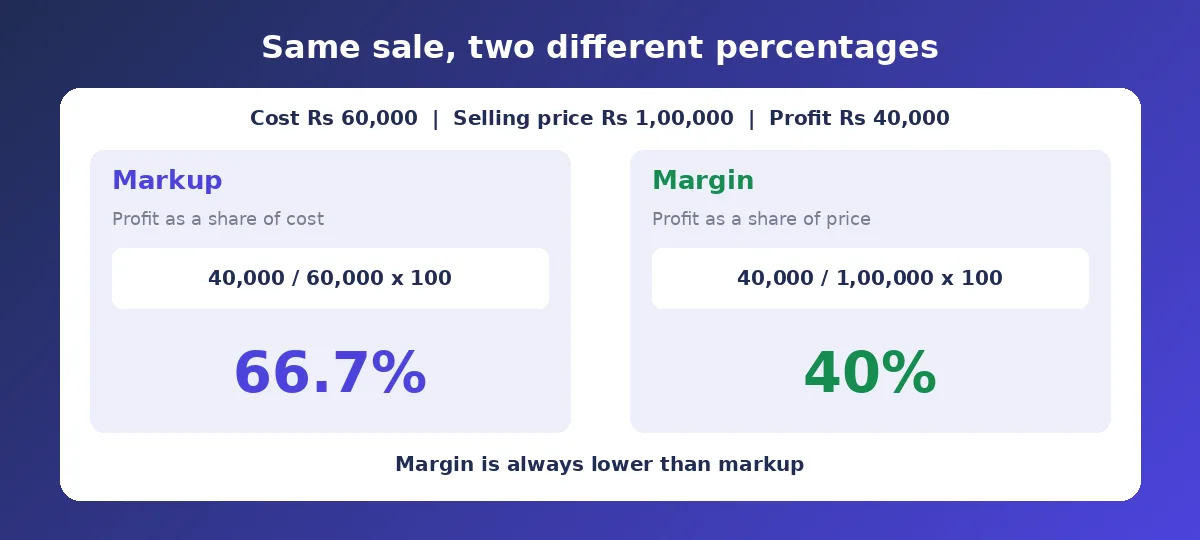
Say a project costs you Rs 60,000 in freelancer fees and tools, and you bill the client Rs 1,00,000. Your profit is Rs 40,000.
- Markup = 40,000 / 60,000 x 100 = 66.7%
- Margin = 40,000 / 1,00,000 x 100 = 40%
The classic mistake
Suppose you want a 40% margin and you add 40% to your cost, because that feels right. On the same Rs 60,000 project, that gives a price of 60,000 x 1.4 = Rs 84,000. Your profit is Rs 24,000, but your margin is 24,000 / 84,000 = 28.6%, not 40%.
How to price for a target margin
For the same project, with a cost of Rs 60,000 and a target margin of 40%:
- Price = 60,000 / (1 - 0.40) = 60,000 / 0.60 = Rs 1,00,000
- Profit = 1,00,000 - 60,000 = Rs 40,000
- Check: 40,000 / 1,00,000 = 40%
If you think in markups, the formula is Price = Cost x (1 + Markup), and the margin you actually earn is Markup / (1 + Markup).
Conversion table
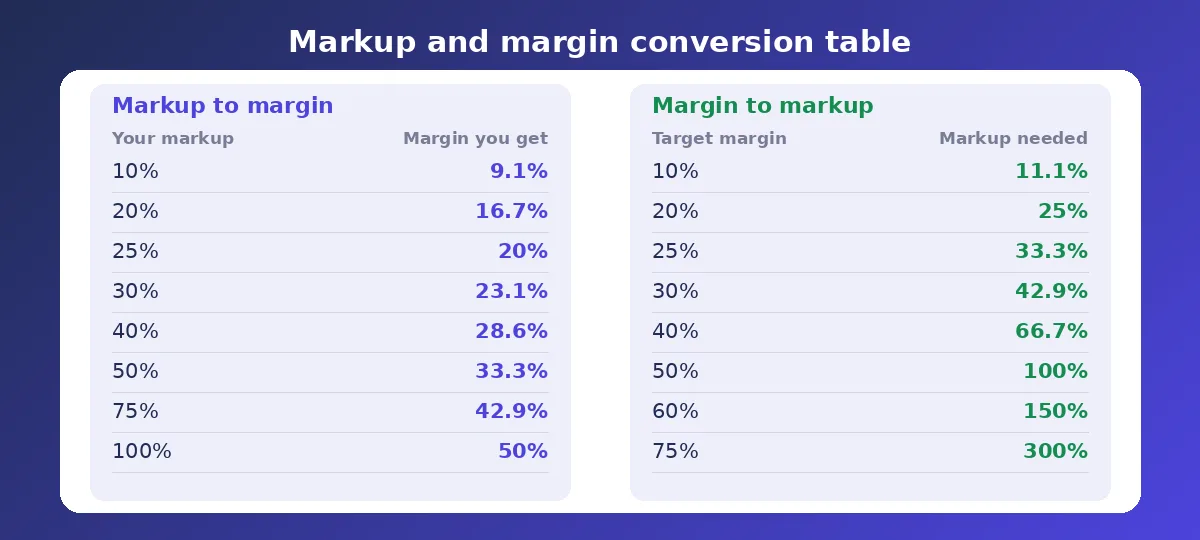
Keep this handy. The left side shows what margin you get from a given markup, and the right side shows the markup you need to reach a target margin.
Rebuild with the Table button, 2 columns:
| If your markup is | Your margin is |
|---|---|
| 10% | 9.1% |
| 20% | 16.7% |
| 25% | 20% |
| 30% | 23.1% |
| 40% | 28.6% |
| 50% | 33.3% |
| 75% | 42.9% |
| 100% | 50% |
Rebuild with the Table button, 2 columns:
| If you want a margin of | You need a markup of |
|---|---|
| 10% | 11.1% |
| 20% | 25% |
| 25% | 33.3% |
| 30% | 42.9% |
| 40% | 66.7% |
| 50% | 100% |
| 60% | 150% |
| 75% | 300% |
Conversion formulas: Margin = Markup / (1 + Markup), and Markup = Margin / (1 - Margin), with the percentages written as decimals.
Pricing an hour of work
The same idea works for hourly rates. Say the real cost of an hour of a team member's time, including salary and the share of direct tools, is Rs 800, and you want a 50% margin.
- Rate = 800 / (1 - 0.50) = Rs 1,600 per hour
- Check: (1,600 - 800) / 1,600 = 50%
Note that a 50% margin means a 100% markup. If you charged Rs 1,200 an hour, thinking you were adding 50%, your margin would be only 33.3%.
Gross margin and net margin
So far, "cost" has meant the direct cost of delivering the work: freelancers, direct salaries, tools used on the project. The resulting figure is a gross margin. It does not include rent, admin salaries and other overheads. Those come out of the gross margin, and what is left is your net margin.
A project can look healthy at a 40% gross margin and still lose money for the business if overheads are heavy. To see where overheads put your break-even, read How to Calculate Break-Even Point for a Service Business. To see how individual clients compare, see How to Track Client Profitability
Calculating it in Excel
Put cost in B2, selling price in B3, and a target margin (as a decimal, such as 0.4) in B4.
Markup: =(B3-B2)/B2 Margin: =(B3-B2)/B3 Price for target margin: =B2/(1-B4) Price for target markup: =B2*(1+B4)
Do not forget GST
Work out your price and margin on the amount before GST, because GST is collected for the government and is not your income. Add GST on top when you raise the invoice. The formulas are in GST Calculation Formula: How to Add and Remove GST, and you can confirm current rates on the GST portal.
MoneyGence shows client-wise revenue and receivables, which are the revenue side of this calculation. The cost side comes from your own records, since MoneyGence does not calculate client margins yet.
Common Mistakes
- Adding the target margin percentage to the cost and calling it margin.
- Mixing up the two terms in a proposal, so the client and your team read different numbers.
- Leaving out part of the cost, such as the time spent on revisions.
- Calculating margin on a GST-inclusive price.
- Quoting a price without checking the margin against your overheads.
- Using one markup for every service, even though their costs differ.
Frequently Asked Questions
What is the difference between markup and margin?
Markup is profit divided by cost. Margin is profit divided by selling price. For the same sale, margin is always lower than markup.
How do I convert markup to margin?
Divide the markup by (1 + markup), using decimals. A 25% markup (0.25) gives a margin of 0.25 / 1.25 = 20%.
How do I convert margin to markup?
Divide the margin by (1 - margin). A 20% margin (0.20) gives a markup of 0.20 / 0.80 = 25%.
Is a 50% markup the same as a 50% margin?
No. A 50% markup gives a 33.3% margin. A 50% margin needs a 100% markup.
What is a good profit margin for a service business?
It depends on your industry, your overheads and how much of the work is billable. Compare your gross margin with your own overheads and break-even point, rather than a generic benchmark.
Related guides:
How to Calculate Break-Even Point for a Service Business
How to Track Client Profitability
Official references
Run a service business? See every client's money on one screen.
MoneyGence shows who has paid, who is overdue and by how many days, with GST-ready invoices, bank reconciliation and renewal alerts alongside your Calculators work. Free for up to 2 clients, no credit card needed.
Start free with 2 clients See how it works →