How to Do a Bank Reconciliation: Step-by-Step Guide with Example

Bank and book balances rarely match on the first try. Here is a simple monthly routine, a worked example, and the usual reasons for the difference.
Category: Accounting | Slug: how-to-do-bank-reconciliation-small-business Do not paste the title or the Direct answer. Start from the opening below.
Open your accounting software and your bank app side by side. If the two balances do not match, you are not alone, and it does not mean something is wrong. It usually means the books and the bank have recorded things on different days, or one of them has recorded something the other has not seen yet.
A bank reconciliation is how you find out which. It takes an hour or less each month for most small businesses, and it is the cheapest way to catch mistakes before your CA does.
What a bank reconciliation does
You compare every line on your bank statement with the matching entry in your books, then explain each difference. When you are done, the adjusted balance on both sides should be the same number. That is it. There is no clever trick involved.
Why it is worth doing every month
- You catch things you forgot to record. Bank charges, interest, auto-debits and small online payments are the usual culprits.
- You spot errors. A payment entered twice, or a receipt booked against the wrong client.
- You notice anything unusual. An unexpected debit is far easier to question this month than six months from now.
- You know your real cash position. The balance in your books is only useful if it reflects what is actually in the bank.
What you need before you start
- The bank statement for the month, as a PDF or an Excel download.
- Your cash book or bank ledger for the same dates.
- The closing balance from last month's reconciliation, if you did one.
The steps
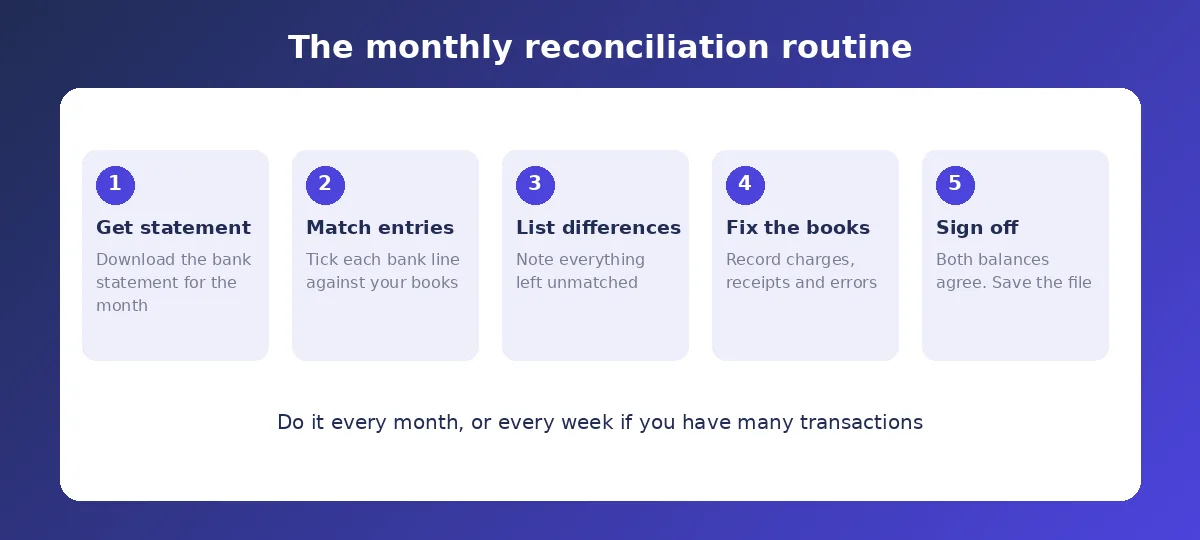
- Start with the opening balances. The opening bank balance and the opening books balance should agree after last month's reconciliation. If they do not, fix that first.
- Tick off matches. Go line by line. Each deposit and payment on the statement should have the same amount and roughly the same date in your books.
- List what is left on the bank side. These are entries the bank has recorded that your books have not, such as bank charges, interest or an auto-debit.
- List what is left on the books side. These are entries you recorded that the bank has not processed yet, such as a cheque that has not cleared or a deposit made late in the day.
- Record the missing entries in your books. Anything the bank has that you do not, add it.
- Leave the timing items alone. Uncleared cheques and deposits in transit are not errors. They will appear on next month's statement.
- Confirm both sides agree. Once adjusted, the bank balance and the books balance should be identical.
A worked example
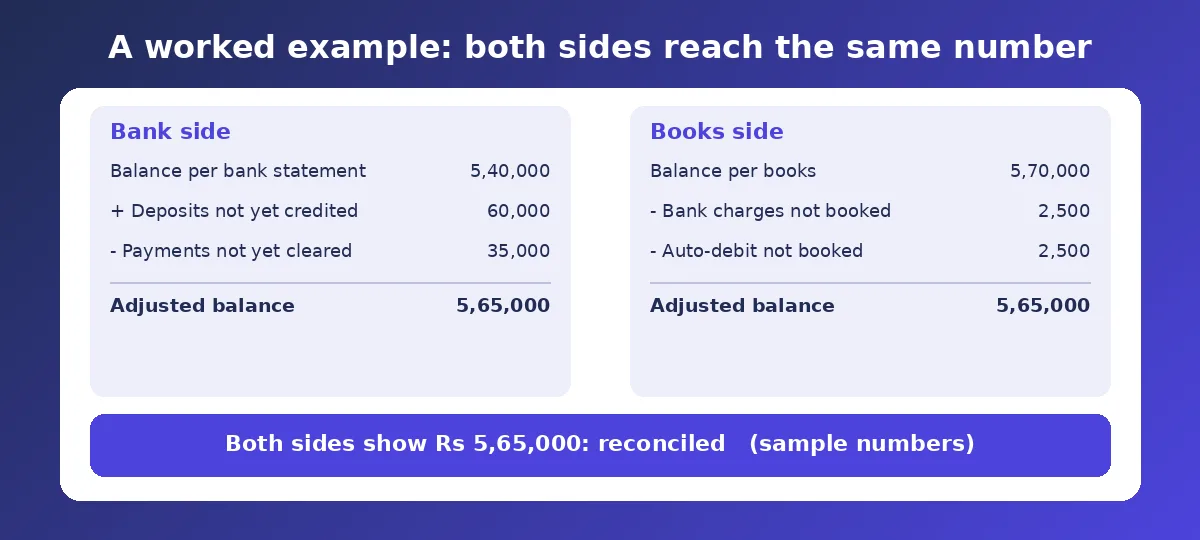
Say the bank statement shows Rs 5,40,000 at month-end, but your books show Rs 5,70,000.
On the bank side, a client deposit of Rs 60,000 was made on the last day and the bank has not credited it yet. A vendor cheque of Rs 35,000 has been issued but not cleared. Adjusting the statement balance gives 5,40,000 + 60,000 - 35,000 = Rs 5,65,000.
On the books side, bank charges of Rs 2,500 and an auto-debit of Rs 2,500 were taken by the bank but never recorded. Adjusting the books gives 5,70,000 - 2,500 - 2,500 = Rs 5,65,000.
Both sides now show Rs 5,65,000, so the account is reconciled.
Why balances differ
- Timing differences. Cheques issued but not yet cleared, and deposits in transit.
- Bank-originated items. Charges, interest, auto-debits, standing instructions.
- Recording errors. A wrong amount, a duplicate, or a transposed number.
- Unrecorded receipts. A client paid directly and nobody told accounts.
How often to do it
Monthly is the usual minimum. If you handle many receipts and payments each day, doing it weekly keeps each session short. Waiting until year-end is the worst option, because small mistakes pile up and you have to untangle twelve months at once.
If you are tired of doing it by hand, tools such as MoneyGence include bank reconciliation, which can help match statement lines with entries. You will still need to review the matches and approve the adjustments yourself.
Common Mistakes
- Reconciling only when the balances look wrong, instead of on a fixed schedule.
- Changing old entries to force a match.
- Writing off a difference as "miscellaneous" without finding the cause.
- Recording uncleared cheques as errors.
- Skipping bank charges because the amounts are small.
- Not saving the reconciliation as evidence for your CA or auditor.
Frequently Asked Questions
What is a bank reconciliation statement?
It is a short document that starts from the bank balance, lists the timing differences, and shows that the adjusted figure matches the balance in your books.
How long does a bank reconciliation take?
For a small business with a few dozen transactions a month, usually under an hour. Doing it regularly keeps it short.
What if I cannot find the difference?
Check for duplicates, transposed digits and unrecorded receipts first. If it still does not agree, narrow it down by reconciling week by week to find where the gap starts.
Should I reconcile every bank account?
Yes, including savings accounts, overdraft accounts and any account used by a payment gateway.
Can I do it in Excel?
Yes. Paste the statement on one sheet and your ledger on another, mark matches, and list the leftovers. It works well for a small number of transactions.
Official references
Need help staying Accounting compliant?
MoneyGence's AI Finance OS tracks your compliance, wallet share, and finances in one place, built for agencies and growing businesses.
Get started with MoneyGence